
Every router brand ships with its own admin interface, default login credentials, and firmware update process — and what works on a Netgear won't necessarily apply to a TP-Link or an Asus. That's why generic router advice only gets you so far. The 40 brand-specific guides in this section cut straight to the steps that matter for your exact hardware, so you're not hunting through menus that look nothing like the screenshots you found elsewhere.
Manufacturers design their admin dashboards independently, which means the location of every setting — from wireless channels to parental controls — differs across brands. Netgear uses the Nighthawk or Orbi interface depending on your model; TP-Link splits its lineup between the older Tether app UI and the newer Deco mesh system; Ubiquiti UniFi is built for professionals and looks nothing like a consumer router panel. Each brand also ships with its own default password conventions, and knowing those quirks upfront saves real troubleshooting time.
Regardless of which brand you own, every guide in this section walks you through the same core tasks adapted to that brand's specific interface:
This category includes setup & login guides for Netgear, TP-Link, Asus, Linksys, Eero, Google Nest, Ubiquiti UniFi, Arris, Motorola, Belkin, and more — 40 guides in total spanning both consumer and prosumer hardware. Whether you're setting up a budget single-router home network or a multi-node mesh system, there's a dedicated guide here for your brand.
Check the label on the bottom of your router for the brand name, then pick the matching guide from the list below. If you're unsure which IP address to use to reach your admin panel, start with the find your router IP address guide before diving into brand-specific steps. Ready to get started? Pick your brand below.

The best budget routers under $100 deliver WiFi 6 speeds, WPA3 security, and reliable coverage. Compare top affordable picks for homes and apartments. [read more]
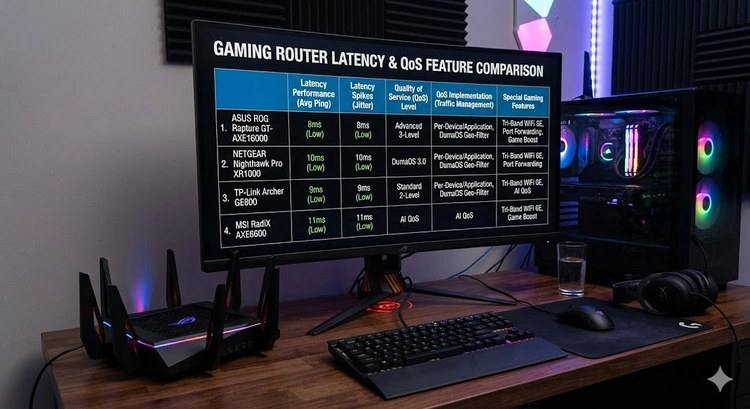
The best gaming routers prioritize low latency with QoS, dedicated gaming ports, and traffic optimization. Compare the top picks for lag-free gaming in 2026. [read more]

The best WiFi 7 routers deliver blazing speeds with MLO, 320 MHz channels, and 4096-QAM. Compare the top picks for speed, coverage, and value in 2026. [read more]

The best mesh WiFi systems blanket large homes with fast, reliable coverage. Compare top mesh routers for coverage, backhaul, speed, and smart home support. [read more]

Complete guide to setting up your Actiontec router used by Verizon and CenturyLink. [read more]

Complete guide to setting up your AmpliFi HD mesh WiFi system at home. [read more]

Log in to your CenturyLink router admin page with default credentials. [read more]

How to set up your CenturyLink modem-router combo with WiFi configuration steps. [read more]

How to access your Cox Panoramic WiFi admin panel with login credentials. [read more]

Complete guide to setting up your Cox Panoramic WiFi gateway for home internet. [read more]
Search
Popular Tools
Browse Guides
Promotion for FREE Gifts. Moreover, Free Items here. Disable Ad Blocker to get them all.
Once done, hit any button as below
 |
 |
 |
 |