by Tommy N. Updated Apr 23, 2026
WiFi 6 (802.11ax) is the most significant leap in wireless technology in over a decade, delivering dramatically faster speeds, better range, and the ability to handle dozens of connected devices without breaking a sweat. If your home network feels sluggish despite a fast internet plan, upgrading to WiFi 6 could be the solution you've been looking for. This guide explains exactly what WiFi 6 is, how it works, and whether it's time to make the switch.

In this guide you'll learn how WiFi 6 differs from older standards, what its real-world benefits are, and how to upgrade your home network step by step. Whether you're experiencing slow WiFi or simply want the best possible wireless performance, understanding WiFi 6 will help you make an informed decision. We'll also cover the best practices for configuring your new router to get the most out of the standard.

WiFi 6, formally known as IEEE 802.11ax, is the sixth generation of the 802.11 wireless networking standard ratified in 2019 by the Wi-Fi Alliance. It operates on both the 2.4 GHz and 5 GHz frequency bands and introduces a suite of new technologies designed not just to increase raw speed, but to improve efficiency in dense, device-heavy environments. The maximum theoretical throughput of WiFi 6 reaches 9.6 Gbps — roughly three times that of WiFi 5 (802.11ac) — though real-world speeds are lower and depend on hardware, interference, and distance.
The headline technology behind WiFi 6 is OFDMA (Orthogonal Frequency Division Multiple Access). Unlike older standards that sent data to one device at a time per channel, OFDMA divides each channel into smaller sub-channels called Resource Units (RUs). This lets your router communicate with multiple devices simultaneously within a single transmission window, dramatically reducing latency and improving throughput when many devices are active at once. Think of it like switching from a single-lane road to a multi-lane highway — each car (device) gets its own lane instead of waiting in line.
MU-MIMO (Multi-User, Multiple Input, Multiple Output) also received a significant upgrade in WiFi 6. WiFi 5 supported 4×4 downlink MU-MIMO, but WiFi 6 extends this to 8×8 on both the uplink and downlink. This means your router can maintain eight simultaneous spatial streams, sending and receiving data to and from eight devices at the same time rather than sequentially. For households with smart TVs, gaming consoles, laptops, tablets, and smart home devices all competing for bandwidth, this is a substantial real-world improvement.
Target Wake Time (TWT) is another WiFi 6 innovation that directly benefits battery-powered devices like smartphones, smart speakers, and IoT sensors. TWT allows the router to schedule specific wake intervals for each device, so devices can sleep between transmissions instead of constantly polling the network. In practice this means your WiFi 6-compatible smartphone or smart home device can see battery life improvements of up to 67% compared to WiFi 5, according to Wi-Fi Alliance testing. Combined with BSS Coloring — a mechanism that tags transmissions to reduce interference from neighboring networks — WiFi 6 is engineered for the modern home filled with dozens of connected devices.
Transitioning to WiFi 6 is straightforward, but doing it correctly ensures you get the full benefit of the new standard.
Understanding how WiFi 6 stacks up against its predecessors helps you appreciate the real-world difference and decide whether upgrading is worth the cost for your situation.
| Standard | Max Theoretical Speed | Frequency Bands | Key Feature |
|---|---|---|---|
| WiFi 4 (802.11n) | 600 Mbps | 2.4 GHz / 5 GHz | MIMO introduced |
| WiFi 5 (802.11ac) | 3.5 Gbps | 5 GHz only | MU-MIMO (downlink), 256-QAM |
| WiFi 6 (802.11ax) | 9.6 Gbps | 2.4 GHz / 5 GHz | OFDMA, TWT, 1024-QAM, BSS Color |
| WiFi 6E (802.11ax) | 9.6 Gbps | 2.4 / 5 / 6 GHz | 6 GHz band (less congestion) |
| WiFi 7 (802.11be) | 46 Gbps | 2.4 / 5 / 6 GHz | Multi-Link Operation, 4096-QAM |
WiFi 6 routers are fully backward compatible with WiFi 5, WiFi 4, and older devices. You can upgrade your router today and your older laptops, smart home gadgets, and gaming consoles will continue to work normally — they just won't benefit from WiFi 6 features until they're replaced with WiFi 6-capable hardware. This makes upgrading the router the logical first step, with device upgrades following naturally over time.
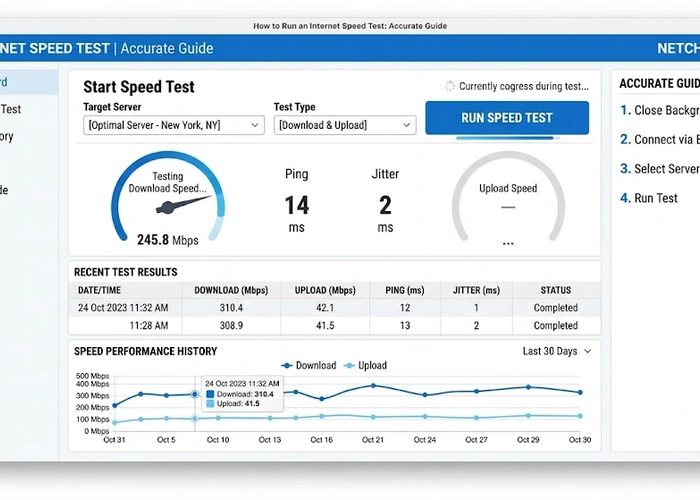
Even with a brand new WiFi 6 router, you may not see the speeds you expected. The most common culprit is that your internet plan itself is the bottleneck — a 200 Mbps cable plan will never deliver gigabit speeds regardless of your router. Run a speed test from a device wired directly to your router to establish your true baseline internet speed, then compare it to your WiFi speeds to identify where the slowdown is occurring.
Router placement has an outsized impact on WiFi 6 performance. The 5 GHz band, where WiFi 6 delivers its fastest speeds, has shorter range and struggles to penetrate walls compared to 2.4 GHz. Position your router in a central, elevated location away from microwaves, cordless phones, and thick concrete or brick walls. If you're in a multi-story home, the router on an upper floor generally outperforms one in a basement. Interference from neighboring networks is also a persistent issue in apartments and dense neighborhoods — use a WiFi channel finder to identify the least congested channel and switch to it manually.
Security configuration is another area that affects performance and safety simultaneously. Mixing WPA2 and WPA3 in transition mode can cause handshake delays with some older devices. Check your WiFi security settings and ensure you're running at minimum WPA2-AES, with WPA3 enabled if your device ecosystem supports it.
Pro Tip: After upgrading to a WiFi 6 router, use our WiFi Channel Finder tool to scan your environment and pick the cleanest channel on both the 2.4 GHz and 5 GHz bands. On a crowded WiFi 6 router, channel selection alone can improve real-world speeds by 20–40% in dense urban environments.
Yes, even on a modest internet plan, WiFi 6's OFDMA and MU-MIMO technologies reduce latency and improve responsiveness when multiple devices are active at once. The benefits go beyond raw speed — you'll notice smoother video calls, less buffering during simultaneous streams, and more stable connections across all your devices. If you have more than five connected devices in your home, the upgrade is worthwhile regardless of your ISP plan speed.
Absolutely — WiFi 6 routers are fully backward compatible with all previous WiFi generations including WiFi 4 (802.11n) and WiFi 5 (802.11ac). Your older devices will connect and work normally, just without the WiFi 6-specific improvements like OFDMA and TWT. You can upgrade your router today and migrate devices to WiFi 6 gradually as you replace them.
WiFi 6E is an extension of the WiFi 6 standard that adds support for the 6 GHz frequency band in addition to the standard 2.4 GHz and 5 GHz bands. The 6 GHz band is much less congested because older devices cannot use it, which means significantly lower interference and more available channels. However, 6 GHz has shorter range than 5 GHz, and both your router and your client devices must support WiFi 6E to benefit from the new band.
Check your device's specifications in the manufacturer's documentation or settings menu — look for "802.11ax" or "WiFi 6" in the wireless specifications. On Windows, open Device Manager, expand Network Adapters, right-click your wireless adapter, and select Properties to view the supported protocols. Most flagship smartphones and laptops released after late 2019 include WiFi 6 support, though budget models may still ship with WiFi 5 adapters.
WiFi 6 does offer modestly improved range compared to WiFi 5, primarily because of BSS Coloring and more efficient signal use at the cell edge. However, the improvement is not dramatic — if your home had dead zones with WiFi 5, a single WiFi 6 router may not fully resolve them. For large homes, a WiFi 6 mesh system is a better solution than relying on raw range improvements from the new standard alone.
Yes, if your devices support it — enabling WPA3 on your WiFi 6 router provides significantly stronger security than WPA2, including protection against offline dictionary attacks and forward secrecy. Most WiFi 6-capable devices also support WPA3, so you can often run WPA3-only mode without compatibility issues. If you have older devices that only support WPA2, configure your router in WPA2/WPA3 transition mode to support both simultaneously.
For authoritative networking standards and specifications, refer to the Internet Assigned Numbers Authority (IANA) or IETF RFC documents.
 |
 |
 |
 |

About Tommy N.
Tommy is the founder of RouterHax and a network engineer with over ten years of experience in home and enterprise networking. He has configured and troubleshot networks ranging from simple home setups to multi-site enterprise deployments, with deep hands-on experience in router configuration, WiFi optimization, and network security. At RouterHax, he oversees editorial direction and covers home networking guides, mesh WiFi system reviews, and practical troubleshooting resources for everyday users.
Search
Popular Tools
Browse Guides
Promotion for FREE Gifts. Moreover, Free Items here. Disable Ad Blocker to get them all.
Once done, hit any button as below
|
|
|
|