
Convert between all data size and network speed units. Enter a value in any field to instantly see the equivalent in bits, bytes, kilobytes, megabytes, gigabytes, terabytes, and common network speed units. Supports both decimal (SI: 1 KB = 1000 bytes) and binary (IEC: 1 KiB = 1024 bytes) standards.
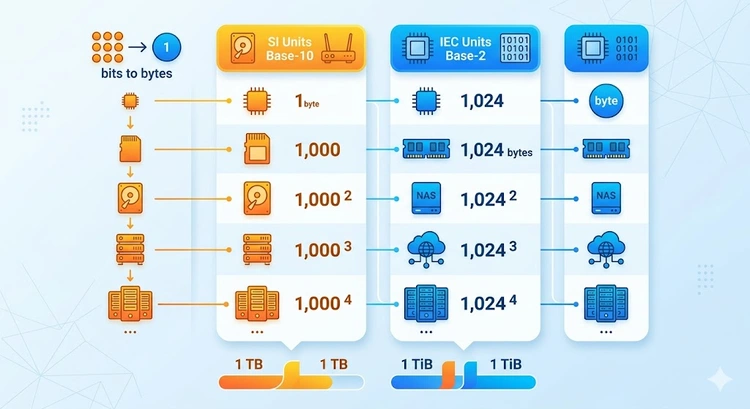
A bit (b) is the smallest unit of data — a single 0 or 1. A byte (B) is a group of 8 bits. This 8:1 ratio is the source of the most common confusion in networking: ISPs advertise speeds in megabits per second (Mbps), but file managers show download speeds in megabytes per second (MB/s). To convert, divide the Mbps by 8.
A 100 Mbps internet connection downloads files at approximately 12.5 MB/s. A 1 Gbps connection maxes out at 125 MB/s. The difference matters when estimating download times with our Bandwidth Calculator.
There are two competing standards for data size units, which causes the well-known discrepancy between advertised and actual storage capacity.
| Decimal (SI) | Factor | Binary (IEC) | Factor | Difference |
|---|---|---|---|---|
| 1 Kilobyte (KB) | 1,000 B | 1 Kibibyte (KiB) | 1,024 B | 2.4% |
| 1 Megabyte (MB) | 1,000,000 B | 1 Mebibyte (MiB) | 1,048,576 B | 4.9% |
| 1 Gigabyte (GB) | 1,000,000,000 B | 1 Gibibyte (GiB) | 1,073,741,824 B | 7.4% |
| 1 Terabyte (TB) | 10^12 B | 1 Tebibyte (TiB) | 2^40 B | 10.0% |
This is why a 1 TB hard drive shows as approximately 931 GB in Windows (which uses binary units internally). The drive actually contains 1,000,000,000,000 bytes as advertised, but Windows divides by 1,073,741,824 (GiB) to display the size. Neither is wrong — they are using different unit systems.
| Data Type | Typical Size | In Bits | Transfer @ 100 Mbps |
|---|---|---|---|
| Plain text email | 10 KB | 80,000 bits | 0.001 seconds |
| Web page (average) | 2 MB | 16,000,000 bits | 0.16 seconds |
| MP3 song (4 min) | 5 MB | 40,000,000 bits | 0.4 seconds |
| HD photo | 8 MB | 64,000,000 bits | 0.64 seconds |
| 1 hour HD video | 3 GB | 24,000,000,000 bits | 4 minutes |
| 4K movie (2 hours) | 14 GB | 112,000,000,000 bits | 18.7 minutes |
| AAA game download | 80 GB | 640,000,000,000 bits | 1.8 hours |
| Full hard drive backup | 1 TB | 8,000,000,000,000 bits | 22.2 hours |
Network speeds are measured in bits per second because data is transmitted serially (one bit at a time) over network cables and wireless links. The common units:
| Unit | Abbreviation | Bits/second | Common Use |
|---|---|---|---|
| Kilobits per second | Kbps | 1,000 | Legacy dial-up (56 Kbps) |
| Megabits per second | Mbps | 1,000,000 | ISP plans (100 Mbps, 300 Mbps) |
| Gigabits per second | Gbps | 1,000,000,000 | Fiber, data center links |
| Kilobytes per second | KB/s | 8,000 | Small file transfers |
| Megabytes per second | MB/s | 8,000,000 | Download manager display |
| Gigabytes per second | GB/s | 8,000,000,000 | NVMe SSD, PCIe transfers |
Pro Tip: When comparing internet plans, always check whether the quoted speed is in Mbps (megabits) or MB/s (megabytes). Some VPN and download tools display in MB/s, which looks 8x slower than the ISP's Mbps number. A 100 Mbps plan showing 12 MB/s downloads is performing exactly as expected.
The bits-vs-bytes confusion leads to real-world consequences. Customers upgrade to a "faster" ISP plan and feel cheated when downloads do not seem faster. Cloud storage providers bill in gigabytes (decimal), but your OS reports usage in gibibytes (binary), making it seem like you have less storage. Understanding these units prevents misdiagnosis of network problems and saves money on storage purchases.
Use the Data Usage Calculator to estimate monthly consumption, or the Internet Speed Test to verify your actual connection speed.
Key Takeaways
Mbps (megabits per second) measures network speed in bits. MB/s (megabytes per second) measures data transfer rate in bytes. Since 1 byte = 8 bits, divide Mbps by 8 to get MB/s. A 100 Mbps connection transfers at 12.5 MB/s maximum.
Storage manufacturers use decimal units (1 GB = 1,000,000,000 bytes), while Windows uses binary units (1 GiB = 1,073,741,824 bytes). A 1 TB drive has exactly 1,000,000,000,000 bytes, but Windows displays this as 931 GB because it divides by the larger binary gigabyte.
Both, depending on context. The SI (decimal) kilobyte is exactly 1,000 bytes. The IEC (binary) kibibyte (KiB) is 1,024 bytes. Networking and storage use decimal; operating systems traditionally use binary. The IEC introduced KiB/MiB/GiB notation in 1998 to resolve this ambiguity, but adoption has been slow.
Multiply by 125. Since 1 Gbps = 1,000 Mbps, and 1 Mbps = 0.125 MB/s, you get 1 Gbps = 125 MB/s. A 10 Gbps connection can transfer at 1,250 MB/s (1.25 GB/s), which is faster than most SSDs.
4K streaming requires approximately 25-35 Mbps (3.1-4.4 MB/s). Netflix recommends 25 Mbps, YouTube recommends 20 Mbps. For multiple simultaneous 4K streams, multiply accordingly. A 100 Mbps connection comfortably handles two to three 4K streams.
Network hardware transmits data serially — one bit at a time over the wire or wireless link. The physical layer clock rate is measured in bits per second. Serial communication standards (RS-232, Ethernet, USB) all use bits because it directly maps to the signaling rate. Storage uses bytes because files are stored as byte-aligned blocks.
 |
 |
 |
 |

About Tommy N.
Tommy is the founder of RouterHax and a network engineer with 10+ years of experience in home and enterprise networking. He specializes in router configuration, WiFi optimization, and network security. When not writing guides, he's testing the latest mesh WiFi systems and helping readers troubleshoot their home networks.
Search
Popular Tools
Browse Guides
Promotion for FREE Gifts. Moreover, Free Items here. Disable Ad Blocker to get them all.
Once done, hit any button as below
|
|
|
|