
The IP Range Calculator instantly breaks down any IPv4 subnet into its component addresses. Enter an IP address and a CIDR prefix — such as 192.168.1.0/24 — and the tool will return the network address, broadcast address, first and last usable host IPs, subnet mask, and total host count. Whether you are designing a home network, configuring a router, or studying for a networking certification, understanding IP ranges is a foundational skill. Learn more about the basics at our What Is an IP Address? guide before using this tool.
CIDR stands for Classless Inter-Domain Routing, a method introduced in 1993 via RFC 4632 to replace the older class-based addressing system. In CIDR notation, an IP address is followed by a forward slash and a number between 0 and 32, such as 10.0.0.0/8. That number indicates how many bits of the 32-bit IP address are reserved for the network portion, leaving the remaining bits for individual hosts.
For example, in 192.168.1.0/24, the first 24 bits identify the network (192.168.1) and the last 8 bits identify hosts (0–255). This gives you 256 total addresses, of which 254 are usable (the first is the network address, the last is the broadcast address). CIDR replaced the old Class A, B, and C system because it allows subnets of arbitrary sizes, making IP address allocation far more efficient. You can explore this topic further at our Subnet Calculator.
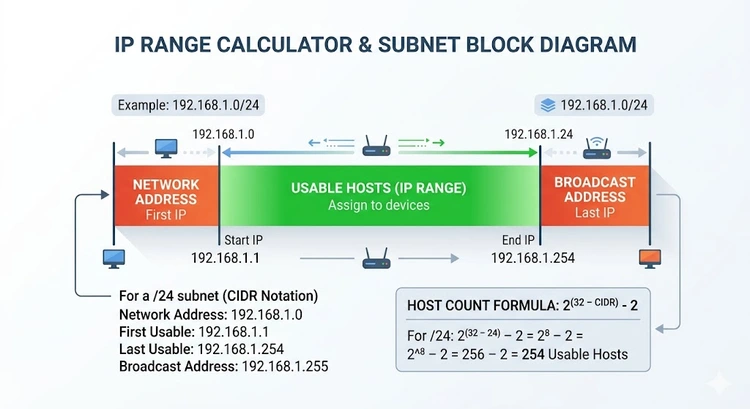
A subnet mask is a 32-bit number that divides an IP address into its network and host portions. Written in dotted-decimal format, the mask for a /24 network is 255.255.255.0. Each 255 in the mask represents 8 fully set bits (11111111 in binary), meaning those octets belong entirely to the network. The 0 at the end represents 8 bits reserved for hosts.
To find the network address of any IP, you perform a binary AND operation between the IP address and the subnet mask. For instance, 192.168.1.45 AND 255.255.255.0 = 192.168.1.0. The broadcast address is calculated by taking the network address and setting all host bits to 1. In the /24 example, that gives 192.168.1.255. Every device on the subnet can receive a broadcast packet sent to that address.
Your router uses subnet masks every time it forwards traffic. Understanding how this works helps when you set up port forwarding, configure static IPs, or troubleshoot devices that cannot reach the network. You can also use our CIDR Converter to translate between prefix notation and dotted-decimal masks instantly.
The table below lists the most commonly used subnet sizes in home and enterprise networking. The Usable Hosts column subtracts the two reserved addresses (network and broadcast) from the total.
| CIDR | Subnet Mask | Total Addresses | Usable Hosts | Common Use |
|---|---|---|---|---|
/8 | 255.0.0.0 | 16,777,216 | 16,777,214 | Large ISP blocks (e.g., 10.x.x.x) |
/16 | 255.255.0.0 | 65,536 | 65,534 | Large enterprise, campus networks |
/20 | 255.255.240.0 | 4,096 | 4,094 | Medium enterprise segments |
/22 | 255.255.252.0 | 1,024 | 1,022 | Office building floors |
/23 | 255.255.254.0 | 512 | 510 | Small office blocks |
/24 | 255.255.255.0 | 256 | 254 | Home networks, small offices |
/25 | 255.255.255.128 | 128 | 126 | Half of a /24 segment |
/26 | 255.255.255.192 | 64 | 62 | Small VLAN segments |
/27 | 255.255.255.224 | 32 | 30 | Point-to-point links, small zones |
/28 | 255.255.255.240 | 16 | 14 | DMZ segments, server farms |
/30 | 255.255.255.252 | 4 | 2 | Router-to-router links |
/31 | 255.255.255.254 | 2 | 2 | Point-to-point (RFC 3021) |
/32 | 255.255.255.255 | 1 | 1 | Host route, loopback |
The /24 subnet is by far the most common for home routers. Your router likely defaults to 192.168.1.0/24 or 192.168.0.0/24, which provides 254 usable addresses — far more than any home needs. If you want to check what IP your router is using right now, visit our Find Router IP Address guide.
Not all IP addresses are reachable from the public internet. The Internet Assigned Numbers Authority (IANA) has reserved three blocks specifically for private networks. These addresses are used internally — your home router assigns them to your devices via DHCP and hides them behind a single public IP using NAT (Network Address Translation).
| Range | CIDR | Total Addresses | Common Use |
|---|---|---|---|
| 10.0.0.0 – 10.255.255.255 | 10.0.0.0/8 | 16,777,216 | Large enterprise, ISP carrier-grade NAT |
| 172.16.0.0 – 172.31.255.255 | 172.16.0.0/12 | 1,048,576 | Medium enterprise networks |
| 192.168.0.0 – 192.168.255.255 | 192.168.0.0/16 | 65,536 | Home routers (192.168.1.x, 192.168.0.x) |
| 127.0.0.0 – 127.255.255.255 | 127.0.0.0/8 | 16,777,216 | Loopback (localhost) |
| 169.254.0.0 – 169.254.255.255 | 169.254.0.0/16 | 65,536 | Link-local (APIPA — no DHCP found) |
If your device gets a 169.254.x.x address, it means DHCP failed and your computer assigned itself an Automatic Private IP Address (APIPA). This typically indicates a problem with your router or network cable. Check our 192.168.1.1 login guide to access your router and verify DHCP settings. To find your current public IP, use our What Is My IP tool.
Most home users never need to calculate IP ranges manually — the router handles it automatically. However, there are several real-world scenarios where understanding and calculating ranges becomes essential:
192.168.1.100–200, you might assign 192.168.1.50 to your server.10.8.0.0/24 for tunnel clients.Most home routers let you change the LAN subnet through the admin interface. Here is the general process, though the exact menu names vary by brand:
192.168.1.1 to 10.0.0.1) and set the subnet mask (e.g., 255.255.255.0 for a /24).10.0.0.100 to 10.0.0.200).After making changes, verify connectivity with your devices. If you are running a Dynamic DNS service, update your DDNS configuration if the LAN range change affects any forwarded services. It is also good practice to update your router firmware before making major network configuration changes.
Pro Tip: When designing a network, always leave room to grow. If you have 50 devices today, pick a
/23(510 hosts) instead of a/24(254 hosts). Adding devices later is painless; changing the subnet later is not. Use our Subnet Calculator to plan your address space, and pair it with our IP Range Calculator to verify the exact boundaries of each segment.
Key Takeaways
/24, /16, etc.) tells you how many bits are in the network portion of an IP address./24 gives 254 usable hosts; a /16 gives 65,534 — each step down doubles the host count.169.254.x.x address means your device failed to get a DHCP lease.CIDR (Classless Inter-Domain Routing) notation represents an IP address combined with a prefix length, such as 192.168.0.0/24. The number after the slash indicates how many bits — out of 32 total — belong to the network portion. This replaced the older Class A/B/C system and allows flexible allocation of any subnet size, not just multiples of /8, /16, or /24.
A /24 subnet uses 24 bits for the network, leaving 8 bits for hosts — giving 256 total addresses (254 usable). A /16 subnet uses only 16 bits for the network, leaving 16 bits for hosts — giving 65,536 total addresses (65,534 usable). A /16 is 256 times larger than a /24. Home networks almost always use /24; large enterprise campus networks often use /16 or larger.
The first address in any subnet is the network address — it identifies the subnet itself and cannot be assigned to a device. The last address is the broadcast address — packets sent to it are delivered to every device on the subnet simultaneously. These two reserved addresses are the reason a /24 yields 254 usable hosts instead of 256. The only exception is /31 subnets (RFC 3021), which allow both addresses to be assigned on point-to-point links.
A subnet mask is a 32-bit number used in dotted-decimal form (e.g., 255.255.255.0) that marks which bits of an IP address belong to the network and which belong to the host. When you AND a device's IP address with the subnet mask, you get the network address. The subnet mask is mathematically equivalent to the CIDR prefix — /24 and 255.255.255.0 describe exactly the same boundary.
Yes. A /32 subnet mask is 255.255.255.255 and refers to a single host — there are no host bits at all. It is used in routing tables as a host route to direct traffic to one specific IP address, commonly seen in loopback interfaces, VPN tunnel endpoints, and firewall rules. A /32 has exactly 1 address, no broadcast, and no usable range beyond the address itself.
A supernet (or supernetting) is the opposite of subnetting — you combine multiple smaller networks into a single larger route. For example, combining 192.168.0.0/24 and 192.168.1.0/24 creates the supernet 192.168.0.0/23. Supernetting is used in routing to reduce the number of entries in a routing table through a process called route aggregation or route summarization. It is common in ISP backbone networks where thousands of routes must be condensed for efficiency.
 |
 |
 |
 |

About Tommy N.
Tommy is the founder of RouterHax and a network engineer with 10+ years of experience in home and enterprise networking. He specializes in router configuration, WiFi optimization, and network security. When not writing guides, he's testing the latest mesh WiFi systems and helping readers troubleshoot their home networks.
Search
Popular Tools
Browse Guides
Promotion for FREE Gifts. Moreover, Free Items here. Disable Ad Blocker to get them all.
Once done, hit any button as below
|
|
|
|