
by Tommy N. Updated Apr 23, 2026
Understanding IPv4 address classes is foundational knowledge for anyone who works with networks — whether you're configuring a home router or managing enterprise infrastructure. IPv4 address classes A, B, C, D, and E were the original system used to divide the entire 32-bit address space into logical groupings, each designed for different types of networks and purposes.

In this guide you'll learn exactly what each IPv4 address class means, how to identify a class from the first octet alone, and why this knowledge still matters even in the era of CIDR. If you've ever wondered what an IP address actually is or why your home router hands out addresses in the 192.168.x.x range, the answer lies in classful addressing — and it's simpler than you might expect.
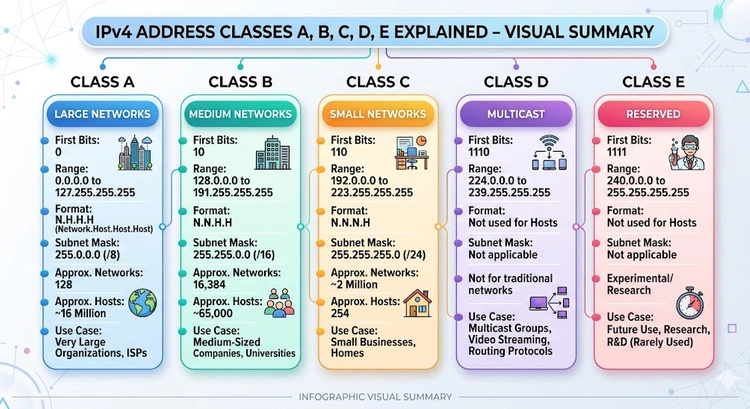
When IPv4 was designed in the early 1980s, the Internet's architects divided the 4,294,967,296 available addresses into five classes — A through E. The class of an address is determined entirely by the value of its first octet (the leftmost 8-bit number). This simple rule lets any router or device instantly categorize an address without any additional configuration, which was critical when processing power was scarce.
Classes A, B, and C are the unicast classes, meaning they identify a single specific network interface. Class A was reserved for the world's largest organizations and governments, offering each registered network over 16 million usable host addresses. Class B served mid-sized universities and corporations with up to 65,534 hosts per network. Class C was the workhorse for small businesses and departments, offering 254 usable hosts per network but with a vastly larger number of available network IDs.
Class D is entirely different in purpose — it is reserved for multicast traffic. A multicast address doesn't identify a single host; instead, it identifies a group of hosts that have subscribed to receive a particular data stream. Our Multicast IP Reference covers the full assigned range with IANA details. This is how protocols like OSPF, PIM, and Internet video streaming efficiently deliver the same packet to multiple recipients simultaneously without flooding the entire network.
Class E addresses were never made available for public use. They were designated as experimental and reserved by IANA, set aside for future research and development purposes. In practice, Class E addresses (240.0.0.0 through 255.255.255.255) are still unroutable on the public Internet, though some proposals have been made over the years to release them as IPv4 exhaustion worsened.
You don't need to memorize every range — just learn the leading bit patterns and the first-octet cutoffs, and you can classify any IPv4 address in seconds.
The table below summarizes the key technical specifications for each class, including address ranges, default subnet masks, and the number of networks and hosts each class supports.
| Class | First Octet Range | Default Subnet Mask | Max Networks |
|---|---|---|---|
| Class A | 1 – 126 | 255.0.0.0 (/8) | 126 networks / ~16.7M hosts each |
| Class B | 128 – 191 | 255.255.0.0 (/16) | 16,384 networks / 65,534 hosts each |
| Class C | 192 – 223 | 255.255.255.0 (/24) | 2,097,152 networks / 254 hosts each |
| Class D | 224 – 239 | N/A (multicast) | 268 million multicast group addresses |
| Class E | 240 – 255 | N/A (reserved) | Reserved — not publicly routable |
The 192.168.0.0/16 block is a Class C private address range defined by RFC 1918. Your router's DHCP server draws from this pool by default because these addresses are never routed on the public Internet, meaning every home or small office can reuse the same addresses locally without conflict. If you want to understand how your router assigns these addresses, check out our guide to what DHCP is and how it works.
Even though classful addressing has largely been replaced by Classless Inter-Domain Routing (CIDR) since RFC 1519 in 1993, classful concepts still appear everywhere: in documentation, legacy equipment, default router settings, and certification exams. Misunderstanding classes is one of the most common sources of confusion when setting up a static IP address or troubleshooting connectivity issues.
A frequent mistake is assuming that because an address looks like a Class C address, it must have a /24 prefix length. Under CIDR, a network administrator can assign any prefix length to any address block — a 192.168.1.0/25 subnet gives you only 126 usable hosts, not 254. Always check the actual subnet mask in your device's settings rather than inferring it from the address class.
Another common source of confusion is the 127.0.0.0/8 block. Although it falls within the Class A range numerically, it is entirely reserved for loopback testing and is not assignable to any network interface. Pinging 127.0.0.1 always tests your own machine's TCP/IP stack, regardless of what is connected to your network.
Pro Tip: If you need to determine the network address, broadcast address, or number of usable hosts for any subnet — whether classful or CIDR-based — use the subnet calculator tool to get instant, accurate results without manual binary math.
Class A addresses (first octet 1–126) support the fewest networks but the most hosts per network — over 16 million. Class B (128–191) offers a balance with up to 65,534 hosts per network, while Class C (192–223) supports only 254 hosts but provides over 2 million distinct network IDs. The class determines the default subnet mask: /8 for A, /16 for B, and /24 for C. To see what IP your own device is using, visit our IP lookup page.
Classful addressing was officially replaced by CIDR (Classless Inter-Domain Routing) in 1993, so modern routing protocols and ISPs no longer use classes to determine subnet boundaries. However, the concepts remain relevant for understanding private address ranges, interpreting legacy documentation, and passing networking certifications like CompTIA Network+ and Cisco CCNA.
Class D addresses (224.0.0.0 to 239.255.255.255) are reserved exclusively for multicast traffic. Instead of sending a packet to a single host or broadcasting to all hosts, multicast allows a single transmission to reach a defined group of subscribers. Common uses include OSPF routing updates (224.0.0.5), IGMP, and video conferencing streams.
The address 127.0.0.1 — commonly called "localhost" — is part of the 127.0.0.0/8 loopback block, which falls numerically within the Class A range but is entirely reserved and never routable. Sending traffic to any 127.x.x.x address causes the operating system to loop it back internally, making it useful for testing local services without involving any physical network hardware.
RFC 1918 defines three private address blocks, one from each unicast class: Class A private is 10.0.0.0/8, Class B private is 172.16.0.0 through 172.31.255.255 (/12 in CIDR), and Class C private is 192.168.0.0/16. These blocks are never routed on the public Internet, so any organization can use them freely on internal networks without registering with IANA.
CIDR (Classless Inter-Domain Routing) abandons the fixed /8, /16, and /24 boundary rules of classful addressing and instead allows any prefix length from /0 to /32. This makes it possible to allocate exactly the right number of addresses for a given network — a /27 block gives 30 usable hosts, for instance — dramatically reducing wasted address space. CIDR notation uses a slash followed by the prefix length, such as 192.168.1.0/24, and is the standard used by all modern routers and Internet infrastructure.
For authoritative networking standards and specifications, refer to the Internet Assigned Numbers Authority (IANA) or IETF RFC documents.
 |
 |
 |
 |

About Tommy N.
Tommy is the founder of RouterHax and a network engineer with over ten years of experience in home and enterprise networking. He has configured and troubleshot networks ranging from simple home setups to multi-site enterprise deployments, with deep hands-on experience in router configuration, WiFi optimization, and network security. At RouterHax, he oversees editorial direction and covers home networking guides, mesh WiFi system reviews, and practical troubleshooting resources for everyday users.
Search
Popular Tools
Browse Guides
Promotion for FREE Gifts. Moreover, Free Items here. Disable Ad Blocker to get them all.
Once done, hit any button as below
|
|
|
|


