by Tommy N. Updated Apr 12, 2026
You don't need to spend hundreds of dollars to get a reliable WiFi router. The best budget routers under $100 in 2026 deliver WiFi 6 performance, solid coverage for apartments and small homes, and essential security features like WPA3 encryption. While you won't find WiFi 7 at this price point yet, the routers in this guide handle everyday browsing, streaming, video calls, and casual gaming with ease.

In this guide, we compare the top affordable routers, explain what you should expect at this price range, and help you decide which features to prioritize when shopping on a budget. First, check your current setup by finding your router's IP address and logging into the admin panel.
Budget routers have improved dramatically. Here's what you can and can't expect at the sub-$100 price point in 2026:
| Feature | Under $100 | $100-$250 | $250+ |
|---|---|---|---|
| WiFi Standard | WiFi 6 (AX) | WiFi 6E / WiFi 7 | WiFi 7 |
| Bands | Dual-band | Tri-band | Quad-band |
| Max Speed | ~1.8 Gbps | ~6 Gbps | ~25+ Gbps |
| Coverage | ~1,500 sq ft | ~2,500 sq ft | ~3,500+ sq ft |
| Ethernet Ports | 4x Gigabit | 4-5x Gigabit/2.5G | 10G + 2.5G ports |
| Security | WPA3, basic firewall | WPA3, threat protection | WPA3, AI security |
| QoS | Basic | Advanced/Adaptive | AI-driven |
| Mesh Support | Limited | Yes | Full mesh ecosystem |
The sweet spot for budget routers is WiFi 6 (802.11ax). This standard delivers meaningful improvements over WiFi 5, including OFDMA for better multi-device performance, 1024-QAM for faster speeds, and target wake time (TWT) for improved device battery life. If you're curious about the underlying technology, our guide on IP addresses explains the basics of how devices communicate on your network.
| Router | Max Speed | Coverage | Bands | Ports | Key Feature | Price Range |
|---|---|---|---|---|---|---|
| TP-Link Archer AX55 | 3 Gbps | 2,500 sq ft | Dual | 1x Gig WAN + 4x Gig LAN | OneMesh compatible | $ |
| ASUS RT-AX1800S | 1.8 Gbps | 2,000 sq ft | Dual | 1x Gig WAN + 4x Gig LAN | AiMesh support | $ |
| Netgear R6700AX | 1.8 Gbps | 1,500 sq ft | Dual | 1x Gig WAN + 4x Gig LAN | Armor security trial | $ |
| D-Link DIR-X1870 | 1.8 Gbps | 1,500 sq ft | Dual | 1x Gig WAN + 4x Gig LAN | Voice assistant support | $ |
| Linksys EA8300 | 2.2 Gbps | 2,000 sq ft | Tri-band | 1x Gig WAN + 4x Gig LAN | Tri-band at budget price | $ |
| TP-Link Archer AX21 | 1.8 Gbps | 2,000 sq ft | Dual | 1x Gig WAN + 4x Gig LAN | Best under $60 | $ |
The Archer AX55 hits the perfect balance of performance, features, and value. With combined speeds up to 3 Gbps, coverage for homes up to 2,500 square feet, and compatibility with TP-Link's OneMesh system, it punches well above its price class. It supports WPA3, includes basic QoS, and features TP-Link's HomeShield security suite.
Setup is straightforward through the Tether app or web interface at 192.168.1.1. The AX55 also supports USB 3.0 file sharing if you want to create a simple network-attached storage setup. Make sure to change the default password right away.
ASUS's budget entry brings many features from their premium lineup to an affordable price. AiMesh support means you can add another ASUS router later to create a mesh network without buying a whole new system. AiProtection (powered by Trend Micro) provides network security monitoring, and parental controls are robust for the price.
The RT-AX1800S is particularly good for households that might want to expand their network later. Start with one router now, and add a second ASUS AiMesh-compatible unit when you need more coverage. Manage your network through 10.0.0.1 or the ASUS Router app.
Netgear's budget offering includes a trial of their Armor security suite and smart parental controls. The R6700AX delivers reliable 1.8 Gbps dual-band performance and covers up to 1,500 square feet. It's best suited for apartments and smaller homes where a single router can reach every room.
The DIR-X1870 includes voice assistant integration with both Alexa and Google Assistant, letting you manage your network with voice commands. D-Link's Eagle Pro AI optimizes your WiFi signal automatically based on your home's layout and connected devices. Understanding DHCP helps if you want to manually configure IP assignments.
The EA8300 is a rare find — a tri-band router under $100. While it runs WiFi 5 rather than WiFi 6, the third band provides extra capacity for busy households. One 5 GHz band handles high-bandwidth activities while the other manages background devices. It supports the Linksys Velop mesh ecosystem for future expansion.
If you need the absolute most value, the Archer AX21 delivers WiFi 6 performance for well under $60. It covers up to 2,000 square feet, supports 40+ connected devices, and includes OneMesh compatibility. It lacks some advanced features of pricier models, but the core WiFi 6 experience is solid.
When you can't have everything, focus on these features in order of importance:
1. WPA3 Security: This is non-negotiable. WPA3 provides significantly stronger encryption than WPA2 and protects against offline dictionary attacks. Every router in this guide supports WPA3. Pair it with a strong WiFi password for maximum security.
2. WiFi 6 (802.11ax): The efficiency improvements of WiFi 6 — OFDMA, MU-MIMO, and TWT — make a noticeable difference even on budget hardware. Avoid WiFi 5 routers unless the price difference is significant.
3. QoS (Quality of Service): Even basic QoS lets you prioritize streaming or gaming traffic. This prevents buffering during video calls when someone else is downloading large files.
4. Guest Network Support: Keeping visitors on a separate network protects your main devices. All routers in this guide support guest networks. Our guest network guide walks through the setup process.
5. Mesh Expandability: If there's any chance you'll need more coverage later, choose a router that supports mesh expansion (OneMesh, AiMesh, etc.). It's much cheaper to add a node than replace your entire setup.
Pro Tip: Before buying a new router, run a speed test on your current setup. If your current speeds are well below your ISP plan, the issue might be your router placement, interference, or ISP throttling — not the router itself. Moving your router to a central location or switching to a less congested WiFi channel can sometimes give you a bigger improvement than a hardware upgrade. Check how NAT works to understand potential bottlenecks.
Budget routers are perfect for many households, but some situations call for a larger investment:
Large homes (2,500+ sq ft): A single budget router won't cover a large home reliably. You'll need either a mesh system or a more powerful router with better range. While you can expand with mesh nodes later, a purpose-built mesh system often performs better.
Multi-gig internet plans: If your ISP plan exceeds 1 Gbps, budget routers with gigabit Ethernet ports create a bottleneck. You need a router with at least a 2.5 Gbps WAN port to take advantage of faster plans.
Heavy smart home users: Homes with 30+ connected devices benefit from the extra radio bands and processing power of mid-range or premium routers. Budget dual-band routers can get congested with too many simultaneous connections.
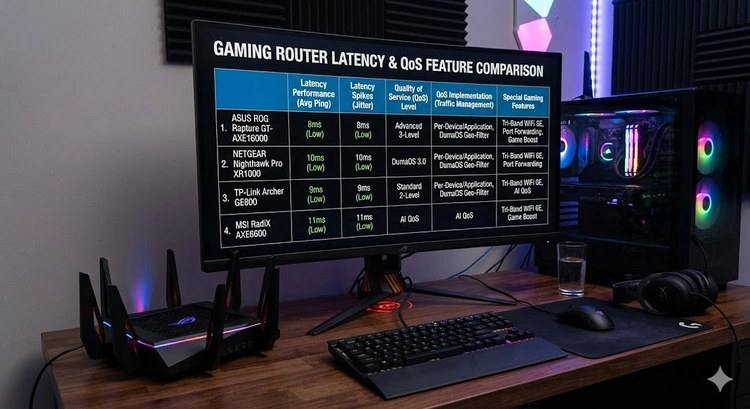
Competitive gamers: If low latency is critical, gaming-specific routers with advanced QoS, dedicated gaming ports, and traffic optimization features are worth the extra investment. Learn about port forwarding to optimize your gaming connection regardless of your router.
For everyone else — browsing, streaming, video calls, and casual use — a budget WiFi 6 router handles it all. Keep your firmware updated and your router well-placed, and you'll be happy with the performance.
Absolutely. WiFi 6 is mature, well-supported by virtually all modern devices, and delivers excellent real-world performance. WiFi 7 is still premium-priced and most consumer devices don't support it yet. WiFi 6 is the smart choice for budget-conscious buyers.
Yes. 4K streaming requires roughly 25 Mbps per stream. Even the most basic WiFi 6 router in this guide delivers well over 100 Mbps to individual devices, which is more than enough for multiple simultaneous 4K streams.
Most WiFi 6 budget routers officially support 25-40 simultaneous devices. In practice, performance starts to degrade around 20-25 active devices on dual-band models. If you have more devices, look for a tri-band option or consider upgrading to a mesh system.
Buy your own. ISP-provided routers are typically outdated, lack features, and cost $10-15/month in rental fees. A $70 budget router pays for itself in 5-7 months and delivers significantly better performance and security. Use your ISP's device as a modem only or return it.
Some do. The ASUS RT-AX1800S supports VPN server and client functionality. The TP-Link Archer AX55 supports VPN server mode. If VPN on the router is important, check the specifications carefully before purchasing. See our VPN setup guide for details.
Expect 3-5 years of solid performance from a quality budget router. WiFi standards evolve, but WiFi 6 will remain relevant for years. The bigger concern is security updates — choose brands that provide regular firmware updates for at least 3 years after purchase.
For an overview of current WiFi standards and what they mean for consumers, visit the Wi-Fi Alliance.
 |
 |
 |
 |

About Tommy N.
Tommy is the founder of RouterHax and a network engineer with 10+ years of experience in home and enterprise networking. He specializes in router configuration, WiFi optimization, and network security. When not writing guides, he's testing the latest mesh WiFi systems and helping readers troubleshoot their home networks.
Promotion for FREE Gifts. Moreover, Free Items here. Disable Ad Blocker to get them all.
Once done, hit any button as below
|
|
|
|