
Use this free WiFi password strength checker to instantly analyze your wireless network password. The tool calculates entropy bits, checks WPA2 and WPA3 compliance, estimates how long a GPU-powered brute-force attack would take to crack your password, and rates your overall security level. Everything runs locally in your browser — your password is never transmitted over the internet.
A strong WiFi password is your first line of defense against unauthorized access to your home or office network. Weak passwords can be cracked in seconds with modern hardware. This tool helps you understand exactly how secure your current password is and what you can do to improve it before an attacker finds out for you.
Privacy Notice: Your password is checked entirely in your browser and is never sent to any server. No data leaves your device.
Not all WiFi passwords are created equal — the security of your wireless network depends heavily on both the protocol you're using and the quality of the password you choose. WPA2 (Wi-Fi Protected Access 2) and WPA3 are the two current standards you'll find on modern routers.
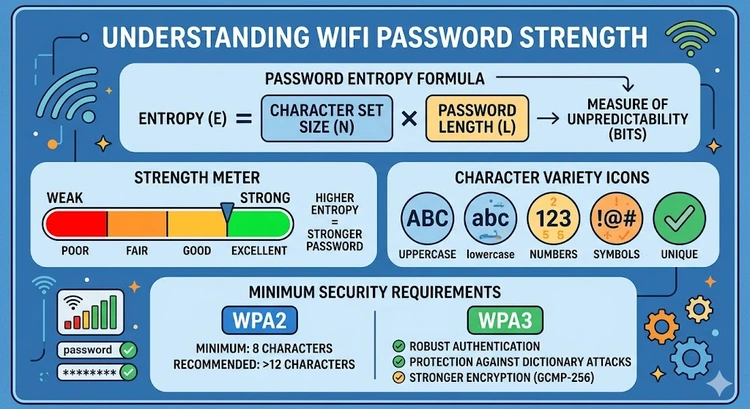
For WPA2-Personal (the most common home network security mode), the minimum password length is 8 characters and the maximum is 63 characters. This range is defined by the 802.11i standard, which uses the password to derive a 256-bit encryption key through PBKDF2 (Password-Based Key Derivation Function 2). While 8 characters technically meets the standard, an 8-character password using only lowercase letters can be cracked in minutes with modern GPU hardware.
WPA3-Personal improves security by using the SAE (Simultaneous Authentication of Equals) handshake, also known as Dragonfly. This protocol is designed to resist offline dictionary attacks even with shorter passwords — but that's not an excuse for a weak password. The WPA3 standard still recommends passwords of at least 12 characters, and best practice is 16 or more characters combining uppercase, lowercase, numbers, and special characters.
To check what security protocol your router is using, log into your router admin panel (commonly at 192.168.1.1 or 10.0.0.1) and look in the wireless security settings. If you're still using WPA (original) or WEP, those protocols are completely broken and you should upgrade immediately. Learn how to access your router at our guide on finding your router IP address.
Entropy is the mathematical measure of randomness and unpredictability in a password. It's expressed in bits, and each additional bit of entropy doubles the number of possible password combinations an attacker must try. This makes entropy the most objective way to compare password strength across different lengths and character sets.
The formula for entropy is: H = L × log₂(N), where H is entropy in bits, L is the password length, and N is the size of the character set. For example, a password using only lowercase letters (26 characters) that is 8 characters long has an entropy of 8 × log₂(26) = 8 × 4.7 = 37.6 bits. Adding uppercase letters expands the character set to 52, giving 8 × log₂(52) = 8 × 5.7 = 45.6 bits. Add digits (62 characters total) and you get 47.6 bits. Add special characters (roughly 94 printable ASCII characters) and a 12-character password achieves about 78.8 bits.
Security guidelines from NIST (the US National Institute of Standards and Technology) suggest that passwords used for encryption keys should have at least 80 bits of entropy. For a WiFi password used to protect a home network, 60+ bits is considered strong, and 80+ bits is excellent. The estimated crack times shown by this tool are based on a modern GPU cluster attempting WPA2 hash computations — a realistic threat model for targeted attacks.
Understanding the differences between WPA2 and WPA3 helps you make informed decisions about your network's security posture. The table below summarizes the key differences that affect password security specifically:
| Feature | WPA2-Personal | WPA3-Personal |
|---|---|---|
| Minimum password length | 8 characters | 8 characters |
| Maximum password length | 63 characters | 63 characters |
| Handshake protocol | 4-way EAPOL handshake | SAE (Dragonfly) |
| Offline attack risk | Yes — PMKID capture enables GPU cracking | Significantly harder — SAE resists offline attacks |
| Forward secrecy | No | Yes — per-session keys |
| Dictionary attack resistance | Relies entirely on password strength | Protocol-level resistance built in |
| Recommended minimum | 12+ characters | 16+ characters (best practice) |
Even though WPA3 offers better protocol-level protection, a strong password is still critical. An attacker who can observe your WiFi traffic and has access to your WPA2 handshake can run offline brute-force attacks at billions of guesses per second on consumer GPU hardware. This makes password strength paramount for WPA2 networks. For WPA3, the SAE handshake prevents offline attacks, but online attacks (trying passwords one at a time) are still limited only by the password's strength.
A strong WiFi password has four key properties: length, character variety, randomness, and uniqueness. Let's look at each one.
Length is the most important factor. Adding one character to a password multiplies the number of possible combinations by the size of the character set. Going from 8 to 12 characters with lowercase letters alone increases combinations from 208 billion to 95 trillion — a 455× increase. At 16 characters, you reach 43 quadrillion combinations. Length beats complexity for brute-force resistance.
Character variety expands the search space. Using only lowercase letters gives 26 possible values per character. Adding uppercase doubles it to 52. Adding digits gives 62. Adding special characters (punctuation, symbols) expands this to about 94. Each expansion multiplies the total combinations at every character position.
Randomness prevents dictionary attacks. A 20-character password made up of common words ("ilovemydogFluffy2024!") is far weaker than its character count suggests because attackers use wordlists and pattern-based attacks rather than pure brute force. True randomness — ideally from a password manager's generator — eliminates this vulnerability.
Uniqueness means it's not reused anywhere else and isn't based on personal information (your address, birthday, pet's name, or router brand) that an attacker might know or guess. Use our password generator tool to create a truly random WiFi password. Once you have a strong password, update it in your router's wireless settings — see our guide on changing router passwords for step-by-step instructions.
Security researchers who analyze password dumps from data breaches consistently find the same terrible passwords appearing on millions of accounts. For WiFi networks specifically, the most commonly used — and most easily cracked — passwords follow predictable patterns:
| Pattern Type | Examples | Why It's Weak |
|---|---|---|
| Simple sequences | 12345678, 11111111, abcdefgh | First in every dictionary attack wordlist |
| Router defaults | admin, password, router, wireless | Tried first by automated tools |
| Personal info | Your name + birth year, address, pet name | Easily guessed from social media |
| Sports teams | Patriots2024, Lakers#1 | Common wordlist entries |
| Keyboard walks | qwerty123, zxcvbnm | Well-known patterns included in wordlists |
| Short passwords | Any 8-character password | Brute-forceable in under an hour with GPU |
Also avoid using your WiFi network name (SSID) as part of your password, as this is a common pattern. If you're using MAC address filtering as an additional security layer, make sure it's combined with a strong password — MAC filtering alone provides minimal security since MAC addresses can be spoofed.
Understanding attack methods helps you appreciate why password strength matters so much. Modern WiFi cracking doesn't require being a sophisticated hacker — automated tools have made it accessible to anyone with a laptop and GPU.
The classic WPA2 attack involves capturing the four-way EAPOL handshake that occurs when a device connects to a WiFi network. An attacker positions themselves near your network, uses a tool to de-authenticate a connected device (forcing it to reconnect), and captures the handshake. This captured handshake can then be taken offline and attacked at full GPU speed — completely independently of your router or network. Tools like Hashcat running on a modern gaming GPU can test 500,000 to several million WPA2 password guesses per second.
A more recent attack method called PMKID capture doesn't even require waiting for a handshake — it can extract a value from the router's beacon frames that can be attacked offline without any connected client. This makes WPA2 networks more vulnerable than was previously understood.
WPA3's SAE handshake was specifically designed to prevent offline attacks. Each authentication attempt requires interaction with the actual router, which limits attackers to online attacks. Even a fast attacker doing online attempts can only try a few hundred passwords per second before the router locks them out — making brute force impractical against any reasonably strong password. Learn how to configure your router's security settings and whether to set up a VPN on your router for additional protection.
Pro Tip: Instead of trying to memorize a complex random password, use a passphrase approach for your WiFi. Choose 5–6 random unrelated words (not a quote or song lyric) and separate them with symbols or numbers: for example, "correct-horse-7-battery-staple!" is 32 characters with mixed character types and achieves over 180 bits of entropy. It's far stronger than "P@ssw0rd1!" while being much easier to type on a phone when guests need to connect. Store it in a password manager for reference.
Key Takeaways
The WPA2 and WPA3 standards both require a minimum of 8 characters and allow a maximum of 63 characters for a WiFi password (technically called a PSK or Pre-Shared Key). However, 8 characters is the absolute minimum — not a recommendation. Security best practice is a minimum of 12 characters for WPA2, and 16+ characters for WPA3. An 8-character password using only lowercase letters can be cracked in under 10 minutes with a modern GPU. A 12-character random password with mixed character types would take thousands of years.
A strong WiFi password has four qualities: it's long (at least 12 characters, ideally 16+), it uses a mix of uppercase letters, lowercase letters, numbers, and special characters, it's truly random (not based on words, names, or patterns), and it's unique (not reused from another account). The most important factor is length — adding characters multiplies the cracking difficulty exponentially. Use our password generator to create a genuinely strong random password.
Yes, WPA2 passwords can be cracked offline if an attacker captures your network's handshake. With a modern GPU, attackers can test millions of password guesses per second. A short or common password can be cracked in minutes. However, a truly random 16-character password would take billions of years to crack even with advanced hardware — making it practically unbreakable. Keep your router firmware updated and consider upgrading to WPA3 if your devices support it.
WPA3 is the latest WiFi security protocol, introduced in 2018 by the Wi-Fi Alliance. It uses SAE (Simultaneous Authentication of Equals) instead of WPA2's 4-way handshake, which prevents offline password cracking attacks. It also provides forward secrecy, meaning past sessions can't be decrypted even if the password is later compromised. If your router and devices support WPA3, upgrading is recommended — especially for security-conscious users. Check your router admin panel at 192.168.1.1 to see if WPA3 is available.
Yes, 100%. This tool runs entirely in JavaScript within your browser. Your password never leaves your device and is never transmitted to any server. You can even disconnect from the internet after loading this page and the tool will still work perfectly. The entropy calculation, crack time estimation, and WPA2/WPA3 compliance checks all happen locally using standard browser JavaScript.
WPA2 and WPA3 passwords can use any printable ASCII character. This includes lowercase letters (a–z), uppercase letters (A–Z), digits (0–9), and special characters including spaces, punctuation, and symbols (! @ # $ % ^ & * and many others). Some older devices or operating systems may have trouble with certain special characters when connecting to WiFi — if you have compatibility issues, stick to letters, numbers, and common symbols like hyphens, underscores, and exclamation marks.
If your WiFi password is already strong (12+ random characters), you don't need to change it on a schedule. Change it when: you've shared it with someone who no longer needs access, you suspect unauthorized devices are using your network, you've had a security incident, or you're moving out of a shared space. Use our guide to check who is on your WiFi to see if there are any unfamiliar devices. A strong, unique password that's carefully managed is better than a weak password changed frequently.
 |
 |
 |
 |

About Tommy N.
Tommy is the founder of RouterHax and a network engineer with 10+ years of experience in home and enterprise networking. He specializes in router configuration, WiFi optimization, and network security. When not writing guides, he's testing the latest mesh WiFi systems and helping readers troubleshoot their home networks.
Search
Popular Tools
Browse Guides
Promotion for FREE Gifts. Moreover, Free Items here. Disable Ad Blocker to get them all.
Once done, hit any button as below
|
|
|
|