
The TCP/IP model is the practical networking model that powers the internet. Unlike the theoretical 7-layer OSI model, TCP/IP uses four layers that map directly to how real protocols and software work. Click any layer below to explore its protocols, functions, and devices.
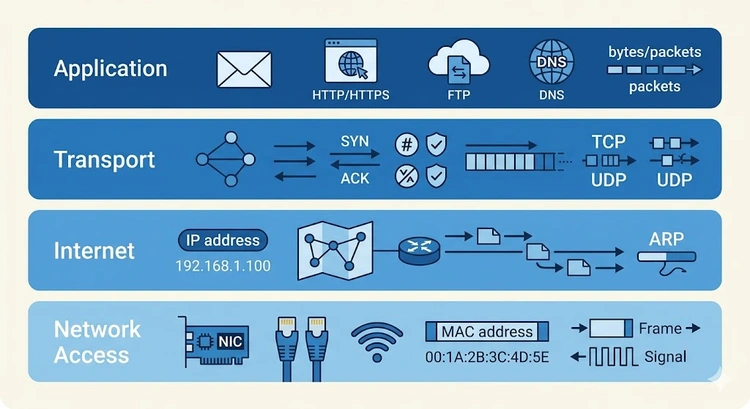
The TCP/IP model (also called the Internet Protocol Suite) is the four-layer networking model that defines how the internet works. Developed by the U.S. Department of Defense in the 1970s, it predates the OSI model and is the practical standard used by every device connected to the internet. While the OSI model has seven theoretical layers, TCP/IP simplifies this into four functional layers.
Every time you browse a website, send an email, or stream a video, your data passes through all four TCP/IP layers. The protocols at each layer work together to deliver data reliably (or quickly, in the case of UDP) from one IP address to another across the global internet.
| TCP/IP Layer | OSI Layer(s) | Key Protocols | Devices |
|---|---|---|---|
| 4. Application | 7, 6, 5 | HTTP, DNS, SMTP, FTP, SSH | App servers, proxies |
| 3. Transport | 4 | TCP, UDP, QUIC | L4 load balancers, firewalls |
| 2. Internet | 3 | IP, ICMP, ARP, IPsec | Routers, L3 switches |
| 1. Network Access | 2, 1 | Ethernet, Wi-Fi, PPP | Switches, NICs, cables |
Pro Tip: The TCP/IP model is more practical for real-world troubleshooting because its layers map directly to software and protocol boundaries. When you run DNS lookups, check TCP ports, or trace ICMP pings, you're working with specific TCP/IP layers. For exams and certifications, know both models — but for daily networking work, think in TCP/IP terms.
The Application layer in TCP/IP combines the functionality of OSI Layers 5, 6, and 7. It provides the protocols that applications use to communicate over the network:
| Protocol | Port | Transport | Function | Related Tool |
|---|---|---|---|---|
| HTTP/HTTPS | 80/443 | TCP | Web browsing | Port Checker |
| DNS | 53 | UDP/TCP | Name resolution | DNS Lookup |
| SMTP | 25/587 | TCP | Email sending | Port Checker |
| SSH | 22 | TCP | Secure shell | Port Checker |
| DHCP | 67/68 | UDP | IP assignment | What Is DHCP? |
| FTP | 20/21 | TCP | File transfer | Port Forwarding |
The Transport layer provides end-to-end communication between applications. The two primary protocols are TCP and UDP:
| Feature | TCP | UDP |
|---|---|---|
| Connection | Connection-oriented (3-way handshake) | Connectionless |
| Reliability | Guaranteed delivery, ordered | Best-effort, no guarantees |
| Flow Control | Yes (sliding window) | No |
| Error Checking | Checksum + retransmission | Checksum only |
| Speed | Slower (overhead) | Faster (minimal overhead) |
| Use Cases | Web, email, file transfer | DNS, streaming, gaming, VoIP |
| Header Size | 20-60 bytes | 8 bytes |
Test transport layer connectivity with our Port Checker — it verifies whether specific TCP ports are open and accepting connections.
The Internet layer handles IP addressing and routing. Every device on the internet has an IP address, and this layer determines the best path for each packet:
The Network Access layer combines physical transmission and data link framing. It handles how data is placed on the physical medium:
| Technology | Medium | Max Speed | Max Distance |
|---|---|---|---|
| Ethernet (Cat5e) | Copper twisted pair | 1 Gbps | 100 m |
| Ethernet (Cat6a) | Copper twisted pair | 10 Gbps | 100 m |
| Wi-Fi 6 (802.11ax) | Radio (2.4/5/6 GHz) | 9.6 Gbps | ~30 m indoors |
| Fiber Optic (SMF) | Glass fiber | 100+ Gbps | 80+ km |
| DOCSIS 3.1 | Coax cable | 10 Gbps down | Varies |
Test your network access layer performance with our Speed Test and Bandwidth Calculator.
When you visit a website like 192.168.1.1, the request passes through each layer:
At the gateway (your router), the Network Access frame is stripped and a new one is created for the next hop, while the IP and TCP layers remain unchanged end-to-end.
The TCP/IP model (Internet Protocol Suite) is a four-layer networking framework that defines how the internet works. Its layers are Application, Transport, Internet, and Network Access. It was developed in the 1970s and is the practical standard used by every internet-connected device.
TCP/IP has four layers: Application (Layer 4), Transport (Layer 3), Internet (Layer 2), and Network Access (Layer 1). Some textbooks show five layers by splitting Network Access into Physical and Data Link, but the original specification defines four.
TCP (Transmission Control Protocol) provides reliable, ordered delivery with connection management and flow control. UDP (User Datagram Protocol) provides fast, connectionless delivery with no delivery guarantees. TCP is used for web, email, and file transfers; UDP is used for DNS, streaming, gaming, and VoIP.
TCP/IP is preferred for practical networking because it maps directly to real protocols and software implementations. The internet was built on TCP/IP, not OSI. The OSI model is more granular (7 layers vs 4) but some of its distinctions (like separate Session and Presentation layers) don't map cleanly to real protocols.
HTTP operates at the Application layer (Layer 4 in TCP/IP, Layer 7 in OSI). It uses TCP at the Transport layer (typically port 80 for HTTP and port 443 for HTTPS) and relies on IP at the Internet layer for routing packets between client and server.
Encapsulation is the process of adding layer-specific headers as data moves down the TCP/IP stack. The Application creates data, Transport adds TCP/UDP headers (segment), Internet adds IP headers (packet), and Network Access adds Ethernet headers (frame). De-encapsulation reverses this at the receiving end.

About Tommy N.
Tommy is the founder of RouterHax and a network engineer with 10+ years of experience in home and enterprise networking. He specializes in router configuration, WiFi optimization, and network security. When not writing guides, he's testing the latest mesh WiFi systems and helping readers troubleshoot their home networks.
 |
 |
 |
 |
Search
Popular Tools
Browse Guides
Promotion for FREE Gifts. Moreover, Free Items here. Disable Ad Blocker to get them all.
Once done, hit any button as below
|
|
|
|