
The OSI (Open Systems Interconnection) model is the foundational framework for understanding how network communication works. Click on any layer below to explore its protocols, data units, devices, and real-world examples.
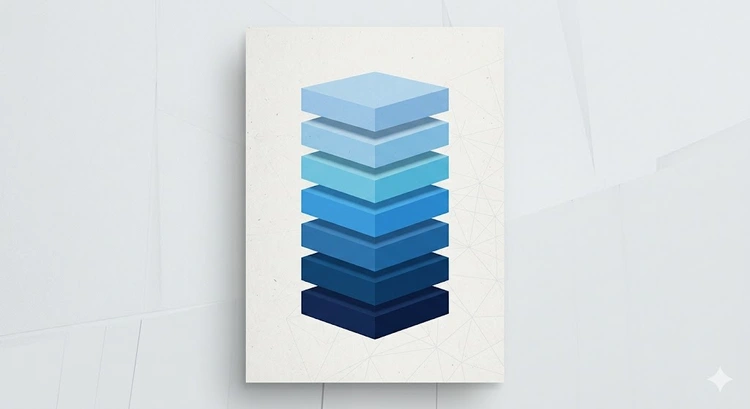
The OSI (Open Systems Interconnection) model is a conceptual framework created by the International Organization for Standardization (ISO) in 1984. It divides network communication into seven distinct layers, each with specific responsibilities. Understanding the OSI model is fundamental to networking — it's the vocabulary used by network engineers to describe and troubleshoot communication problems.
When you visit a website, your request passes through all seven layers on its way out and back again. Each layer adds its own headers and processing. For example, the Application layer handles DNS resolution, the Transport layer manages TCP ports, and the Network layer handles IP addressing.
| # | Layer | PDU | Key Function | Key Protocol |
|---|---|---|---|---|
| 7 | Application | Data | User interface to network | HTTP, DNS, SMTP |
| 6 | Presentation | Data | Data format, encryption | SSL/TLS, JPEG |
| 5 | Session | Data | Session management | NetBIOS, RPC |
| 4 | Transport | Segment | End-to-end delivery | TCP, UDP |
| 3 | Network | Packet | Routing, IP addressing | IP, ICMP, OSPF |
| 2 | Data Link | Frame | MAC addressing, switching | Ethernet, Wi-Fi |
| 1 | Physical | Bit | Physical transmission | Cables, signals |
Pro Tip: A common mnemonic to remember the layers (top to bottom) is "All People Seem To Need Data Processing" — Application, Presentation, Session, Transport, Network, Data Link, Physical. For bottom-to-top, try "Please Do Not Throw Sausage Pizza Away." Understanding which layer a problem exists at is the key to efficient network troubleshooting.
The Application layer is the closest to the end user. It provides the interface between the user's applications and the network. When you type a URL in your browser, you're interacting with Layer 7 protocols like HTTP and DNS.
Common Layer 7 operations include:
Layer 3 is where IP addressing and routing happen. Your router is primarily a Layer 3 device — it reads the destination IP address in each packet and forwards it toward the correct network.
| Protocol | Function | Related Tool |
|---|---|---|
| IPv4/IPv6 | Logical addressing | Subnet Calculator |
| ICMP | Error reporting, ping | Ping Test |
| ARP | IP to MAC resolution | MAC Lookup |
| OSPF/BGP/RIP | Routing protocols | — |
| NAT | Address translation | What Is NAT? |
In practice, the internet uses the TCP/IP model (4 layers) rather than the OSI model (7 layers). The OSI model is used primarily as an educational and reference framework:
| OSI Layer | TCP/IP Layer | Protocols |
|---|---|---|
| 7 - Application | Application | HTTP, DNS, SMTP, FTP |
| 6 - Presentation | SSL/TLS, encoding | |
| 5 - Session | Session management | |
| 4 - Transport | Transport | TCP, UDP |
| 3 - Network | Internet | IP, ICMP |
| 2 - Data Link | Network Access | Ethernet, Wi-Fi |
| 1 - Physical | Cables, signals |
For a detailed look at the TCP/IP model, see our TCP/IP Layer Reference.
When diagnosing network problems, work through the layers systematically:
This bottom-up approach (or top-down, starting from Layer 7) ensures you systematically eliminate possible failure points. If you're having DNS issues, you know the problem is at Layer 7. If you can't ping the gateway, the issue is at Layer 3 or below.
As data moves down the OSI layers, each layer adds its own header (and sometimes trailer) to the data. This process is called encapsulation:
At the receiving end, this process is reversed (de-encapsulation), with each layer stripping its header and passing the data up.
The OSI model is used as a conceptual framework for understanding and troubleshooting network communication. Network engineers use it to describe where problems occur ("the issue is at Layer 3"), design network architectures, and communicate about networking concepts. While the internet uses the TCP/IP model, OSI remains the standard teaching and reference framework.
The OSI model has seven layers: Physical (1), Data Link (2), Network (3), Transport (4), Session (5), Presentation (6), and Application (7). Data flows down from Layer 7 to Layer 1 when sending, and up from Layer 1 to Layer 7 when receiving.
Routers primarily operate at Layer 3 (Network layer) because they make forwarding decisions based on IP addresses. However, modern routers often include functionality at other layers — NAT firewalls operate at Layer 4, and application-aware routers can inspect Layer 7 traffic for QoS and security.
The OSI model has 7 layers and is a theoretical framework. The TCP/IP model has 4 layers (Application, Transport, Internet, Network Access) and describes how the internet actually works. The TCP/IP model combines OSI Layers 5-7 into a single Application layer and Layers 1-2 into Network Access.
DNS operates at Layer 7 (Application layer) of the OSI model. It uses UDP port 53 (Layer 4 Transport) for most queries and TCP port 53 for zone transfers and large responses. DNS over HTTPS (DoH) adds Layer 6 encryption via TLS.
A PDU (Protocol Data Unit) is the name for data at each OSI layer. At Layer 7 it's simply "data," at Layer 4 it's a "segment" (TCP) or "datagram" (UDP), at Layer 3 it's a "packet," at Layer 2 it's a "frame," and at Layer 1 it's "bits." Each PDU includes the previous layer's PDU plus its own header.
Start from Layer 1 and work up (bottom-up approach): check physical connections first, then verify MAC/switch connectivity (Layer 2), then IP/routing (Layer 3), then port access (Layer 4), and finally application services (Layer 7). This systematic approach ensures you identify the root cause rather than just symptoms.

About Tommy N.
Tommy is the founder of RouterHax and a network engineer with 10+ years of experience in home and enterprise networking. He specializes in router configuration, WiFi optimization, and network security. When not writing guides, he's testing the latest mesh WiFi systems and helping readers troubleshoot their home networks.
 |
 |
 |
 |
Search
Popular Tools
Browse Guides
Promotion for FREE Gifts. Moreover, Free Items here. Disable Ad Blocker to get them all.
Once done, hit any button as below
|
|
|
|