
Plan your network switch requirements by adding devices, calculating total port needs, and getting switch configuration recommendations. Factor in uplinks, PoE requirements, and growth — all calculated locally in your browser.
| Device Type | Ports Each | Qty | PoE | Total Ports |
|---|
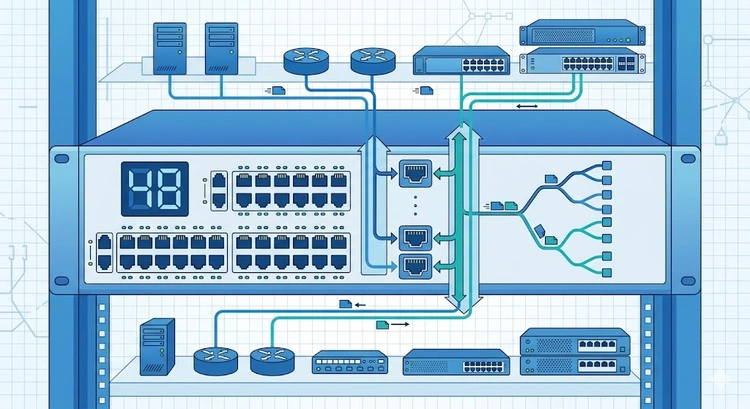
A network switch is a Layer 2 device that connects multiple devices on a local area network (LAN) by forwarding Ethernet frames based on MAC addresses. Unlike a router that operates at Layer 3 (IP routing between networks), a switch handles communication within a single network. If you've looked up a device's hardware address with our MAC Address Lookup, you've seen the identifiers that switches use to direct traffic.
Choosing the right switch involves balancing port count, speed, PoE capability, and management features. This calculator helps you determine exactly how many ports you need before you shop.
The most important decision when selecting a switch is whether to choose managed or unmanaged. The right choice depends on your network complexity and security requirements:
| Feature | Unmanaged | Managed | Smart Managed (Web) |
|---|---|---|---|
| Price | Low ($20-60) | High ($100-500+) | Mid ($50-150) |
| Configuration | Plug and play | Full CLI/GUI | Web GUI only |
| VLANs | No | Yes (802.1Q) | Basic VLAN |
| QoS | No | Yes (802.1p/DSCP) | Basic QoS |
| Link Aggregation | No | Yes (LACP) | Sometimes |
| SNMP Monitoring | No | Yes | Limited |
| Port Mirroring | No | Yes | Sometimes |
| Best For | Home, small office | Enterprise, complex networks | Growing SMB |
If you're planning to separate IoT devices on their own network or connect two routers, a managed switch with VLAN support is essential.
Modern switches come in several speed tiers. Match your switch speed to your bandwidth requirements:
| Speed | Standard | Cable Required | Typical Use |
|---|---|---|---|
| 100 Mbps | Fast Ethernet (802.3u) | Cat5e+ | Legacy devices, IoT sensors |
| 1 Gbps | Gigabit Ethernet (802.3ab) | Cat5e+ | Standard desktops, phones, cameras |
| 2.5 Gbps | Multi-Gig (802.3bz) | Cat5e+ (short), Cat6 | WiFi 6 APs, NAS |
| 5 Gbps | Multi-Gig (802.3bz) | Cat6+ | High-performance workstations |
| 10 Gbps | 10GBASE-T (802.3an) | Cat6a (100m), Cat6 (55m) | Servers, storage, backbone |
Pro Tip: When planning a new network, invest in at least one 10Gbps uplink port between your switch and router. Even if your current devices are 1Gbps, WiFi 6E access points and NAS devices increasingly benefit from multi-gig connections. A switch with 2.5G or 10G uplinks future-proofs your backbone. Check our Bandwidth Calculator to estimate your aggregate throughput needs.
Follow these steps to determine your switch needs:
Here are typical switch configurations for different environments:
Count all wired devices, add 1-2 uplink ports, then add 20-30% for growth. For example, 15 devices + 2 uplinks + 25% buffer = 22 ports, so a 24-port switch is the right choice. Use the calculator above for precise planning.
For a simple home network with fewer than 10 devices, an unmanaged switch is fine. If you need VLANs, QoS, PoE management, or IoT network segmentation, choose a managed switch. Smart managed switches offer a middle ground with web-based configuration.
Yes, this is called cascading or daisy-chaining. Connect switches using an uplink port on each. For best performance, use the fastest available port (10G SFP+ if available). Avoid daisy-chaining more than 3 switches deep to prevent latency. See our guide on connecting network devices.
A router connects different networks (like your LAN to the internet) and operates at Layer 3 using IP addresses. A switch connects devices within the same network at Layer 2 using MAC addresses. Most home networks need both — the router handles internet access while the switch provides additional wired ports.
If you have IP cameras, WiFi access points, VoIP phones, or IoT sensors, a PoE switch eliminates the need for individual power adapters. Check our PoE Power Budget Calculator to ensure your switch can handle the total power draw.
Link aggregation (LACP/802.3ad) bonds multiple physical ports into one logical link for increased bandwidth and redundancy. For example, two 1Gbps ports bonded provide 2Gbps throughput. This requires a managed switch and a compatible device (NAS, server) on the other end.

About Tommy N.
Tommy is the founder of RouterHax and a network engineer with 10+ years of experience in home and enterprise networking. He specializes in router configuration, WiFi optimization, and network security. When not writing guides, he's testing the latest mesh WiFi systems and helping readers troubleshoot their home networks.
 |
 |
 |
 |
Search
Popular Tools
Browse Guides
Promotion for FREE Gifts. Moreover, Free Items here. Disable Ad Blocker to get them all.
Once done, hit any button as below
|
|
|
|