
IPv6 addresses can appear in many different forms — full expanded notation, compressed shorthand, or somewhere in between. This free IPv6 converter tool lets you expand a compressed IPv6 address to its full 128-bit representation, compress a full address to its shortest valid form, or validate that any IPv6 address is properly formatted. Whether you're studying for a networking certification, configuring a firewall, or troubleshooting a connection, understanding what an IP address is in its IPv6 form is an essential skill. Use the tool below and then read on to understand exactly how IPv6 notation works.
IPv6 — Internet Protocol version 6 — is the most recent version of the Internet Protocol, the communications protocol that provides identification and location systems for computers on networks. It was developed by the Internet Engineering Task Force (IETF) to address the long-anticipated exhaustion of IPv4 address space. The official specification is defined in RFC 8200.
While IPv4 uses 32-bit addresses giving approximately 4.3 billion unique addresses, IPv6 uses 128-bit addresses providing approximately 3.4 × 1038 unique addresses — a number so vast it could assign billions of addresses to every atom on Earth's surface. This essentially eliminates the address exhaustion problem that has plagued the internet since the early 2000s.
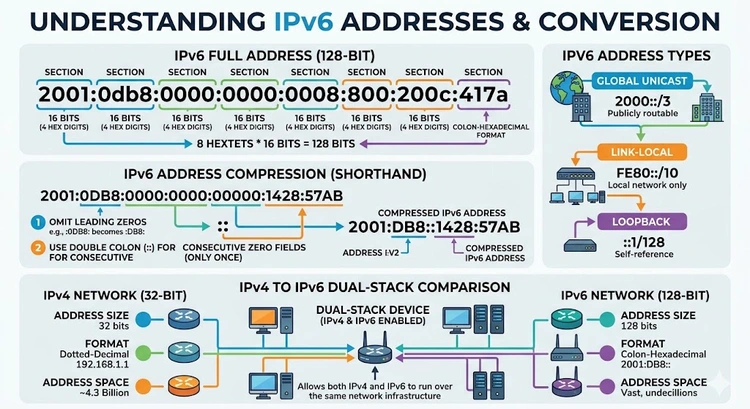
Every device that connects to the internet needs a unique IP address. With the explosion of smartphones, IoT devices, smart home appliances, and connected cars, the 4.3 billion addresses of IPv4 simply aren't enough. IPv6 solves this at a fundamental level. You can check your current IP address to see whether your ISP has assigned you an IPv6 address yet.
An IPv6 address is 128 bits long, written as eight groups of four hexadecimal digits separated by colons. Each group represents 16 bits (two bytes). Here is a fully expanded IPv6 address:
2001:0db8:0000:0000:0000:ff00:0042:8329
That's eight groups of four hex digits each. Hexadecimal uses digits 0–9 plus letters a–f, so each group can represent values from 0000 to ffff (0 to 65,535 in decimal).
Because IPv6 addresses are long and difficult to type, two abbreviation rules are defined in the standard:
0db8 becomes db8, and 0042 becomes 42.::. This may only be used once in an address to avoid ambiguity.Applying both rules to the example above:
2001:0db8:0000:0000:0000:ff00:0042:8329
→ 2001:db8:0:0:0:ff00:42:8329  (drop leading zeros)
→ 2001:db8::ff00:42:8329       (collapse consecutive zeros)
To expand a compressed address back to full form, you reverse the process: restore the :: to as many 0000 groups as are needed to make eight groups total, then re-pad each group to four digits.
This tool also helps with DNS troubleshooting — many DNS AAAA record lookups return compressed IPv6 forms, and knowing how to expand them is crucial for verification.
IPv6 isn't just a bigger IPv4 — it's a redesigned protocol with several improvements. Here's a detailed comparison:
| Feature | IPv4 | IPv6 |
|---|---|---|
| Address length | 32 bits | 128 bits |
| Address format | Dotted decimal (e.g., 192.168.1.1) | Colon-separated hex (e.g., 2001:db8::1) |
| Total addresses | ~4.3 billion | ~3.4 × 1038 |
| NAT required? | Yes (address exhaustion workaround) | No (enough addresses for every device) |
| Header size | 20–60 bytes (variable) | 40 bytes (fixed) |
| Fragmentation | Routers and hosts | Source host only |
| IPsec support | Optional | Mandatory (built-in) |
| Autoconfiguration | Requires DHCP | SLAAC (stateless autoconfiguration) |
| Broadcast | Yes | No (uses multicast) |
| Checksum in header | Yes | No (handled by upper layers) |
| Global adoption (2025) | ~55% of traffic | ~45% of traffic (growing) |
One of the most important differences is the elimination of NAT (Network Address Translation). NAT was invented as a stopgap to extend the life of IPv4 by letting many devices share a single public IP. With IPv6, every device can have its own globally routable address, simplifying network architecture significantly.
Not all IPv6 addresses serve the same purpose. The protocol defines several address types, each identified by a specific prefix range:
| Type | Prefix | Example | Use Case |
|---|---|---|---|
| Global Unicast | 2000::/3 | 2001:db8::1 | Public internet routing (equivalent to public IPv4) |
| Link-Local | fe80::/10 | fe80::1 | Communication within local network segment only |
| Loopback | ::1/128 | ::1 | Localhost (equivalent to 127.0.0.1) |
| Unique Local | fc00::/7 | fd00::1 | Private networks (equivalent to RFC 1918 IPv4) |
| Multicast | ff00::/8 | ff02::1 | One-to-many group addressing |
| Documentation | 2001:db8::/32 | 2001:db8:1::1 | Examples and documentation only |
| 6to4 | 2002::/16 | 2002:c000:201:: | IPv4-to-IPv6 transition tunneling |
Global Unicast addresses are the IPv6 equivalent of public IPv4 addresses. They're routable on the internet and unique globally. ISPs assign these to customers. The range 2001:db8::/32 is reserved specifically for use in documentation and examples — you'll see it throughout networking textbooks and RFCs but never in production traffic.
Link-Local addresses (fe80::/10) are automatically configured on every IPv6-capable interface. They're only valid for communication on the directly connected link — they cannot be routed. Your router uses these internally for neighbor discovery, which replaces ARP in IPv6. If you've run ipconfig on Windows and seen an address starting with fe80, that's a link-local address.
Unique Local addresses (fc00::/7) are the IPv6 counterpart to private IPv4 ranges like 192.168.x.x and 10.x.x.x. They're globally unique within an organization but not routable on the public internet. The fd00::/8 subrange (where the 8th bit is set) is the locally assigned portion and the most commonly used.
Understanding these address types is key when you're setting up a VPN on your router or configuring firewall rules for IPv6 traffic.
The two compression rules work together to produce the shortest possible valid representation of an IPv6 address. Let's walk through several examples to build intuition:
Example 1 — Loopback address:
Full form:      0000:0000:0000:0000:0000:0000:0000:0001
Drop zeros:     0:0:0:0:0:0:0:1
Double colon:   ::1
Example 2 — Link-local address:
Full form:      fe80:0000:0000:0000:0202:b3ff:fe1e:8329
Drop zeros:     fe80:0:0:0:202:b3ff:fe1e:8329
Double colon:   fe80::202:b3ff:fe1e:8329
Example 3 — Two separate zero runs (only the LONGER one gets ::):
Full form:      2001:0db8:0000:0000:0001:0000:0000:0001
Drop zeros:     2001:db8:0:0:1:0:0:1
Best compress:  2001:db8::1:0:0:1  (compress the first longer run)
Note: if two zero runs are equal in length, the first one is typically replaced with :: by convention.
The double-colon rule is why you must only use :: once. If it appeared twice, expanding the address back to full form would be ambiguous — you wouldn't know how many zero groups each :: represents.
When checking your IP address for IPv6, tools may return the compressed form. This converter lets you see the full expanded form to verify every group.
Quick Reference: IPv6 Compression Rules
0042 → 42:::: can appear only once in an address::, fill with enough 0000 groups to reach eight totalIPv6 adoption has been gradual but is now accelerating. As of 2025, Google reports that approximately 45% of users access its services over IPv6, up from less than 1% in 2010. Major mobile carriers — including T-Mobile, AT&T, and Verizon in the US — deliver the majority of mobile data over IPv6. Large content providers like Facebook, Netflix, and Cloudflare fully support IPv6.
The remaining holdouts are typically enterprise networks and ISPs that made large investments in IPv4 infrastructure and NAT-based architectures. Transitioning these networks is expensive and operationally complex, but the pressure to do so increases as IPv4 address blocks become increasingly scarce and expensive.
From a home networking perspective, your ISP may have already assigned you an IPv6 prefix. Many modern home routers support DHCPv6 and SLAAC for automatic IPv6 configuration. If you want to check whether your router is IPv6-capable, look in the WAN settings for IPv6 or 6rd tunnel options. You can also find your router's IP address and log in to check its IPv6 configuration page.
IPv6 also matters for security. Because every device can have a globally routable address, the traditional assumption that "behind NAT means safe" no longer holds. Firewall rules must explicitly account for IPv6 traffic. If you're setting up a VPN on your router, make sure it handles IPv6 correctly — a misconfigured VPN may leak your real IPv6 address even when the IPv4 is tunneled.
For network administrators, tools like this IPv6 converter are essential when reading packet captures, configuring access control lists, or troubleshooting prefix delegation. Check your router's firmware update page — many manufacturers have shipped significant IPv6 bug fixes in recent years.
Pro Tip: When entering IPv6 addresses in firewall rules or configuration files, always use the fully expanded form to avoid ambiguity. Different systems parse compressed IPv6 differently, and a mistake with the double-colon can produce a valid-looking but completely wrong address. Use this tool to expand any compressed address before copying it into a production configuration.
Key Takeaways
::.:: can only appear once in an IPv6 address.IPv6 (Internet Protocol version 6) is the latest version of the Internet Protocol, designed to replace IPv4. It uses 128-bit addresses instead of 32-bit addresses, providing approximately 3.4 × 1038 unique addresses compared to IPv4's 4.3 billion. IPv6 was standardized in RFC 8200 and includes improvements such as a simplified fixed-length header, built-in IPsec support, and native multicast support.
IPv4 has only about 4.3 billion addresses, and with billions of internet-connected devices worldwide, this pool was exhausted at the regional registry level around 2011–2019. IPv6 solves this with an astronomically larger address space. It also eliminates the need for NAT (which adds complexity and breaks end-to-end connectivity), improves routing efficiency with a fixed header size, and enables stateless autoconfiguration (SLAAC) so devices can configure themselves without a DHCP server.
Two rules apply: First, leading zeros within any group of four hex digits can be omitted (so 0042 becomes 42). Second, one consecutive sequence of all-zero groups can be replaced with a double colon ::. The double colon can only be used once per address. To reverse the compression, count the existing groups, determine how many are missing to reach eight total, and insert that many 0000 groups in place of ::, then re-pad each group to four digits.
IPv6 has mandatory support for IPsec (IP Security), which provides authentication and encryption at the network layer. In contrast, IPsec is optional in IPv4. Additionally, IPv6 eliminates NAT, which — while not a security mechanism — often obscured internal network topology. However, this also means that without a proper firewall, every IPv6-addressed device is directly reachable from the internet. Proper firewall configuration is essential with IPv6 deployments.
Most home users don't need to manually configure IPv6 — your router and ISP handle it automatically if supported. However, having IPv6 connectivity can improve performance when accessing IPv6-native services (like Google and Facebook), as it avoids the overhead of IPv4-to-IPv6 translation proxies. Check your router's WAN settings to see if your ISP provides an IPv6 prefix via DHCPv6 or prefix delegation.
A link-local address is an IPv6 address in the fe80::/10 range that is automatically configured on every IPv6-capable network interface. It is only valid for communication on the directly connected network segment — packets with a link-local source or destination address are never forwarded by routers. Link-local addresses are used for IPv6 neighbor discovery (the replacement for ARP), router discovery, and other local network functions. You'll see them in ipconfig or ip addr output on any modern OS.
Log into your router's admin panel (typically at 192.168.1.1 or 10.0.0.1). Navigate to the WAN or Internet settings section and look for an IPv6 tab or section. Select your connection type — usually DHCPv6 or 6rd depending on your ISP. If your ISP supports IPv6, save the settings and your router will request an IPv6 prefix. Then enable IPv6 on the LAN side (prefix delegation) so connected devices receive IPv6 addresses automatically. After saving, you can check your IP to confirm you have an IPv6 address.
 |
 |
 |
 |

About Tommy N.
Tommy is the founder of RouterHax and a network engineer with 10+ years of experience in home and enterprise networking. He specializes in router configuration, WiFi optimization, and network security. When not writing guides, he's testing the latest mesh WiFi systems and helping readers troubleshoot their home networks.
Search
Popular Tools
Browse Guides
Promotion for FREE Gifts. Moreover, Free Items here. Disable Ad Blocker to get them all.
Once done, hit any button as below
|
|
|
|