
This free IP address converter translates any IPv4 address between all common number formats: dotted decimal (the familiar 192.168.1.1 format), hexadecimal, dotted hex, binary, 32-bit integer, and octal. Enter an address in any of these formats and instantly see all the others. The tool is invaluable for network engineers reading packet captures, developers working with IP storage in databases, students studying subnetting and binary arithmetic, and anyone working with Windows registry network settings.
Understanding how IP addresses are represented in different number systems is a core competency for networking professionals. Whether you're reading a Wireshark capture, examining a Windows registry entry, writing code that stores IP addresses as integers, or studying for a CCNA exam, this converter has you covered.
Enter an IP address in any format and select the input type, then click Convert.
Hexadecimal (base-16) is the preferred number system for representing binary data in networking and computing because it strikes the perfect balance between human readability and close alignment with how computers actually store data. Computers work natively in binary (base-2), where every value is represented as a sequence of 0s and 1s. Pure binary notation is accurate but extremely verbose — an IPv4 address in binary requires 32 individual digits. Decimal notation is comfortable for humans but has no clean relationship with binary values. Hexadecimal is the middle ground.
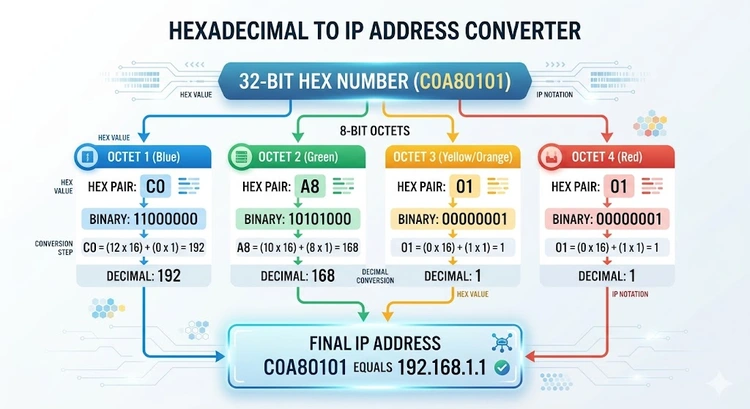
The key property of hex is that each hex digit represents exactly four binary bits (a nibble). This means one hex byte (two hex digits) represents exactly eight binary bits. An IPv4 address is 32 bits, which corresponds to exactly eight hex digits or four hex bytes. There's a clean, lossless conversion between binary and hex that doesn't exist between binary and decimal.
For network engineers reading packet captures in tools like Wireshark, MAC addresses and IP headers appear in hex because that's how the raw bytes are stored. For developers storing IP addresses in databases or operating system registries, integer or hex representation is more efficient than storing dotted-decimal strings. Understanding both forms of representation is fundamental to reading and understanding raw network data. Our Subnet Calculator also works with binary and hex prefix notation for advanced users.
At the hardware and protocol level, an IPv4 address is simply a 32-bit unsigned integer. The familiar dotted decimal notation (192.168.1.1) is purely a human convenience for reading and writing addresses — the actual storage and transmission is always as a 32-bit number in network byte order (big-endian, meaning the most significant byte comes first).
When an IP address travels inside an IP packet header, it occupies exactly 4 bytes (octets). The IPv4 specification (RFC 791) defines the packet format, showing the source and destination IP addresses as 32-bit fields. The IP stack in your operating system converts between the dotted decimal strings you see in configuration interfaces and the raw 32-bit integers used internally and on the wire.
In the Windows registry, IP addresses associated with network adapters are sometimes stored as 32-bit DWORD values in little-endian format — the opposite byte order from network byte order. This can cause confusion when reading registry values directly, because a DWORD of 0x0101A8C0 in the registry corresponds to 192.168.1.1 (the bytes are reversed). Network protocol analyzers always display values in network byte order (big-endian), so 192.168.1.1 appears as 0xC0A80101. Linux kernel structures and most network programming APIs use network byte order throughout, with helper functions like htonl() (host-to-network long) and ntohl() (network-to-host long) to convert between the two when needed.
Programming languages that deal with IP addresses in integer form frequently encounter the 3232235777 representation of 192.168.1.1. This is simply the decimal value of the 32-bit binary number 11000000.10101000.00000001.00000001. Database administrators often store IPs as unsigned 32-bit integers for faster indexing and comparison — a range query like "give me all IPs in 192.168.1.0/24" is trivially expressed as a range query on integers. Understanding what an IP address is at the binary level makes all of these representations click into place.
This table shows 192.168.1.1 represented in all common formats to help you visualize how the different notations relate to each other:
| Format | Example (192.168.1.1) | Used In |
|---|---|---|
| Dotted Decimal | 192.168.1.1 |
All human-facing interfaces, configuration files, ping commands |
| Dotted Hexadecimal | C0.A8.01.01 |
Some Unix/Linux config files, network debugging output |
| Full Hexadecimal | 0xC0A80101 |
Windows registry, C/C++ source code, packet headers, Wireshark filters |
| Dotted Binary | 11000000.10101000.00000001.00000001 |
Subnet mask calculations, CIDR prefix teaching, networking textbooks |
| 32-bit Integer | 3232235777 |
Database storage, Python socket library, Java InetAddress, API parameters |
| Octal | 030052000401 |
Rare — some older Unix utilities, occasionally seen in C literals |
Hex IP representations aren't just academic curiosities — you'll encounter them regularly in real-world networking work. Knowing how to read them without reaching for a converter is a valuable skill.
Wireshark and packet captures: When you capture raw network traffic, IP addresses in packet headers appear as raw hex bytes. A destination IP of C0 A8 01 01 in a hex dump is immediately recognizable as 192.168.1.1 once you know the mapping. Wireshark converts these automatically in the packet details pane, but the raw hex view is often more reliable for byte-level analysis.
Windows Registry: Several registry keys under HKLM\SYSTEM\CurrentControlSet\Services\Tcpip store IP addresses as DWORD values. Remember that Windows stores these in little-endian format, so the byte order is reversed from what you expect. The IP 192.168.1.1 (0xC0A80101 in big-endian) appears as 0x0101A8C0 in the registry.
DHCP lease files: The ISC DHCP server (used on many Linux/router systems) and some other DHCP implementations store IP addresses in hex in their lease database files. A lease for 192.168.1.100 might appear as c0:a8:01:64 in the lease file. Understanding how DHCP assigns addresses includes being able to read these lease files. Check your router's DHCP leases via the admin panel at 192.168.1.1 or 10.0.0.1.
Linux /proc filesystem: On Linux systems, the file /proc/net/tcp lists all TCP connections with IP addresses in hex, in little-endian format. The local address 0100007F corresponds to 127.0.0.1 (loopback) — each pair of hex digits is a byte, read right-to-left for little-endian. Network administrators and system programmers reading these files need to be comfortable with hex-to-decimal conversion on the fly.
Network device configuration: Some managed switches, older Cisco IOS commands, and embedded network device firmware display or accept IP addresses in hex notation. When configuring access control lists or static routes on such devices, being able to convert on the fly saves time and prevents errors. Our DNS Lookup tool can also help you verify that hex IPs resolve correctly.
Memorizing the hex equivalents of the most common IP address prefixes makes real-world hex IP reading much faster. Here are the most frequently encountered private and special address ranges in hex form:
| Decimal Range | Hex Prefix | Notes |
|---|---|---|
| 10.x.x.x | 0A.xx.xx.xx |
RFC 1918 Class A private; 10 decimal = 0A hex |
| 127.x.x.x | 7F.xx.xx.xx |
Loopback range; 127 decimal = 7F hex |
| 169.254.x.x | A9.FE.xx.xx |
APIPA link-local; 169=A9, 254=FE |
| 172.16.x.x – 172.31.x.x | AC.10.xx.xx – AC.1F.xx.xx |
RFC 1918 Class B private; 172=AC, 16-31=10-1F |
| 192.168.x.x | C0.A8.xx.xx |
RFC 1918 Class C private; 192=C0, 168=A8 |
| 224.x.x.x – 239.x.x.x | E0.xx.xx.xx – EF.xx.xx.xx |
Multicast Class D range |
| 255.255.255.255 | FF.FF.FF.FF |
Limited broadcast; 255 decimal = FF hex |
The most important one to memorize is C0.A8 = 192.168, since this prefix appears constantly in home and small office networking. Recognizing it immediately in Wireshark captures or log files signals that you're looking at a private address — traffic from a device on a local LAN. Combine this knowledge with our Network Class Identifier tool to classify any address you encounter. Also check our MAC address guide since MAC addresses also use hex notation throughout.
Being able to convert IP addresses to hex manually — without a tool — is useful for certification exams, quick mental checks, and times when you don't have a converter available. The process is straightforward once you know the steps.
To convert from dotted decimal to hex: take each octet separately and convert it from decimal to hex. For 192.168.1.1:
To convert from hex back to decimal: reverse the process. For 0xC0A80101, split into bytes C0, A8, 01, 01. Convert each: C0 = (12 × 16) + 0 = 192; A8 = (10 × 16) + 8 = 168; 01 = 1; 01 = 1. Result: 192.168.1.1.
The hex digits and their decimal values to memorize: A=10, B=11, C=12, D=13, E=14, F=15. All other hex digits (0–9) are the same as their decimal values. This small lookup table is all you need to manually convert any IP address between decimal and hex. Understanding this binary-hex relationship deepens your grasp of how NAT processes addresses and how port forwarding rules target specific IP addresses.
Pro Tip: When you see an IP address in a Windows DWORD registry value or in Linux's /proc/net/tcp, remember that these systems store the address in little-endian (host byte order) format — the bytes are reversed compared to what you'd expect. The address 192.168.1.1 (0xC0A80101 in big-endian/network order) appears as 0x0101A8C0 in a Windows registry DWORD and in /proc/net/tcp. Always swap byte pairs when reading host-endian values. Network packet captures (Wireshark, tcpdump) always use big-endian network byte order, so no swapping is needed there.
Key Takeaways
IP addresses are shown in hexadecimal because that's how they're stored at the binary level, and hex has a clean 1-to-1 mapping with binary (each hex digit = 4 bits). When reading raw network data, packet captures, system files, or registry values, hex is more efficient than binary and more directly representative of the underlying data than decimal. Dotted decimal is a human-friendly convention, but the hardware always works in binary/hex.
0xC0A80101 is the hexadecimal representation of the IP address 192.168.1.1. Breaking it down: C0 = 192, A8 = 168, 01 = 1, 01 = 1. This is one of the most commonly seen hex IPs because 192.168.1.1 is the default gateway address on millions of home routers. You'll frequently encounter 0xC0A80101 in Wireshark captures, C/C++ code, and some router configuration files.
Convert each octet separately from decimal to hexadecimal. Divide by 16 to get the first hex digit, then take the remainder as the second digit (using A–F for values 10–15). For example, 192: 192 ÷ 16 = 12 remainder 0, so C0. Then 168: 168 ÷ 16 = 10 remainder 8, so A8. Then 1 → 01, and 1 → 01. Combined: C0A80101. The key conversions to memorize are A=10, B=11, C=12, D=13, E=14, F=15.
In Windows, hex IP addresses appear in the registry under HKLM\SYSTEM\CurrentControlSet\Services\Tcpip\Parameters\Interfaces. DHCP-assigned addresses, subnet masks, and default gateways may be stored as DWORD (hex) values. They're stored in little-endian format, so the byte order is reversed — 192.168.1.1 (0xC0A80101 in network order) appears as 0x0101A8C0 as a Windows DWORD. You also see hex IPs in netstat output and some network diagnostic tools.
A 32-bit IP address refers to the raw integer representation of an IPv4 address. All IPv4 addresses are fundamentally 32-bit unsigned integers ranging from 0 (0.0.0.0) to 4,294,967,295 (255.255.255.255). The dotted decimal format splits this 32-bit number into four 8-bit groups (octets) separated by dots for readability. For example, 192.168.1.1 = 3,232,235,777 as a 32-bit integer. This integer form is used in database storage, programming APIs, and system internals.
Windows stores many network configuration values as DWORD (32-bit integer) registry values, and the registry editor displays DWORDs in hexadecimal by default. Storing IPs as 32-bit integers is efficient — it takes exactly 4 bytes rather than the variable-length string "192.168.100.200" which takes 15 bytes. The hex display makes it easier to inspect raw binary values. The little-endian byte order in the registry is consistent with how x86/x64 processors store multi-byte integers in memory.
Both hex and binary represent the same underlying 32-bit integer, just in different bases. Binary shows all 32 bits explicitly as 0s and 1s (e.g., 11000000.10101000.00000001.00000001 for 192.168.1.1). Hexadecimal is a compressed form where each hex digit represents exactly 4 binary bits, so the 32-bit binary address becomes just 8 hex digits (C0A80101). Binary is used in networking education for visualizing subnet masks and CIDR operations; hex is used in practice for compact representation of raw data.
 |
 |
 |
 |

About Tommy N.
Tommy is the founder of RouterHax and a network engineer with 10+ years of experience in home and enterprise networking. He specializes in router configuration, WiFi optimization, and network security. When not writing guides, he's testing the latest mesh WiFi systems and helping readers troubleshoot their home networks.
Search
Popular Tools
Browse Guides
Promotion for FREE Gifts. Moreover, Free Items here. Disable Ad Blocker to get them all.
Once done, hit any button as below
|
|
|
|