
by Tommy N. Updated Apr 12, 2026
Every millisecond matters in competitive gaming. The best gaming routers don't just deliver fast download speeds — they prioritize low latency, intelligent QoS, and stable connections that keep you in the game without lag spikes. A gaming router with the right features can shave 10-30ms off your ping and eliminate the rubber-banding and packet loss that ruin matches.
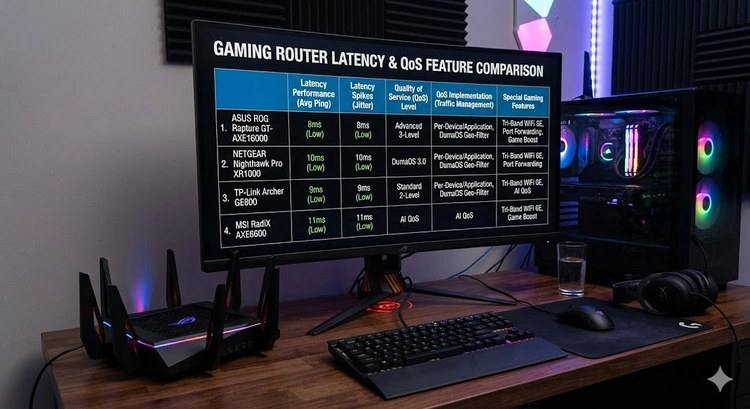
In this guide, we review the top gaming routers of 2026, compare their latency-reducing features, and cover the network settings that make the biggest difference for online gaming. If you're new to network configuration, start by finding your router's IP address so you can access the admin panel.
Gaming routers differ from standard routers in several important ways. While any router can technically handle online gaming, dedicated gaming routers include features specifically designed to reduce latency and prioritize game traffic:
| Feature | What It Does | Impact on Gaming |
|---|---|---|
| QoS (Quality of Service) | Prioritizes game packets over other traffic | Prevents lag when others are streaming/downloading |
| MU-MIMO | Serves multiple devices simultaneously | Reduces wait time for WiFi transmissions |
| Gaming-specific firmware | Optimized packet handling, game detection | Automatic traffic optimization per game |
| Fast processor | Handles routing decisions faster | Lower processing latency on the router itself |
| Low-latency mode | Reduces buffering and processing delays | Direct reduction in ping times |
| Geo-fencing | Forces connections to nearby game servers | Prevents matchmaking with distant servers |
The most impactful feature is QoS. When someone in your household starts a large download or streams 4K video, your gaming traffic gets deprioritized on a standard router. QoS ensures your game packets always get first priority, maintaining low latency regardless of what else is happening on the network. Understanding DNS configuration also helps, as DNS resolution speed affects initial game server connections.
| Router | WiFi Standard | QoS Type | Ports | Gaming Features | Price Range |
|---|---|---|---|---|---|
| ASUS ROG Rapture GT-BE98 | WiFi 7 | Adaptive QoS | 2x 10G + 4x 2.5G | Triple-level acceleration, VPN Fusion | $$$$ |
| Netgear Nighthawk Pro XR1000 | WiFi 6 | DumaOS QoS | 1x 2.5G + 4x 1G | Geo-filter, ping heatmap | $$ |
| TP-Link Archer GE800 | WiFi 7 | Game Accelerator | 2x 10G + 4x 2.5G | Game panel, VPN acceleration | $$$ |
| MSI RadiX BE22000 | WiFi 7 | AI QoS | 1x 10G + 4x 2.5G | AI engine, gaming LAN port | $$$ |
| ASUS RT-AX86U Pro | WiFi 6 | Adaptive QoS | 1x 2.5G + 4x 1G | Mobile game boost, port forwarding | $$ |
| Netgear Nighthawk RS700 | WiFi 7 | Smart QoS | 1x 10G + 4x 1G | Low-latency mode, Armor security | $$$ |
The ROG Rapture GT-BE98 is the undisputed king of gaming routers. This quad-band WiFi 7 beast features ASUS's triple-level game acceleration: game boost optimizes packet priority, a dedicated gaming port provides a direct hardware-level fast lane, and the WTFast GPN (Gamers Private Network) routes your game traffic through optimized servers worldwide.
With dual 10 Gbps ports and four 2.5 Gbps ports, wired connections are blazing fast. The VPN Fusion feature lets you run a VPN on specific devices while keeping your gaming traffic on a direct connection — no VPN overhead on your game data. Set it up through 192.168.1.1 or the ROG app.
The XR1000 runs DumaOS, the gold standard for gaming-focused router firmware. Its geo-filter feature lets you draw a radius on a map and force your game to only connect to servers within that area — eliminating high-ping matches with players across the world. The ping heatmap shows real-time latency to every game server so you can make informed decisions.
While it's WiFi 6 rather than WiFi 7, the XR1000's software features and aggressive price make it the best value gaming router available. You should update the admin password during initial setup.
TP-Link's gaming flagship brings WiFi 7 speeds and a dedicated game panel that displays real-time stats for connected gaming devices. The Game Accelerator detects and prioritizes game traffic automatically, and VPN acceleration keeps your speeds high even when using a VPN for geo-restricted content.
MSI brings its gaming hardware expertise to networking with the RadiX BE22000. The AI QoS engine learns your usage patterns and automatically adjusts traffic priorities. A dedicated gaming LAN port bypasses the router's internal switch for the lowest possible wired latency.
For gamers who don't need WiFi 7, the RT-AX86U Pro is the sweet spot of performance and value. It includes Adaptive QoS, a dedicated gaming port, mobile game boost for smartphone gaming, and AiProtection Pro security. It's also AiMesh compatible if you need to extend coverage. Consider setting up a guest network to keep visitors off your gaming connection.
While not marketed specifically as a gaming router, the RS700's WiFi 7 capabilities and low-latency mode make it a strong contender. Its 10G Ethernet port is perfect for direct-wired gaming PCs, and the Armor security suite protects against DDoS attacks that can disrupt online gaming sessions.
Port forwarding opens specific network ports to allow direct connections to game servers, reducing latency and improving connection quality. Here are the most common ports you'll need. For a detailed walkthrough, see our port forwarding guide.
| Platform/Game | TCP Ports | UDP Ports |
|---|---|---|
| Xbox Live | 3074 | 88, 500, 3074, 3544, 4500 |
| PlayStation Network | 1935, 3478-3480 | 3074, 3478-3479 |
| Steam | 27015-27030 | 27000-27031, 4380 |
| Call of Duty | 3074, 27014-27050 | 3074, 3478, 4379-4380 |
| Fortnite | 5222, 5795-5847 | 5222, 5795-5847 |
| Minecraft | 25565 | 19132-19133, 25565 |
Only forward ports you actually need. Each open port is a potential security risk. Never forward wide port ranges, and always use strong passwords on any services exposed through forwarded ports. Consider using UPnP for automatic port management if your games support it.
The debate is settled: wired Ethernet is always better for competitive gaming. Even the best WiFi 7 connection adds latency variability that Ethernet doesn't have. WiFi introduces jitter — inconsistent ping times — that causes micro-stutters and rubber-banding even when your average ping looks fine.
That said, modern WiFi 7 with MLO has narrowed the gap significantly. Casual gamers on WiFi 7 may not notice a meaningful difference. But for ranked competitive play, tournament settings, or streaming while gaming, always use Ethernet. Run a test on our speed test tool on both WiFi and Ethernet to see the difference for yourself.
Beyond choosing the right router, these settings and practices will help minimize your gaming latency:
Use a wired connection. Connect your gaming device directly to the router via Ethernet. If your router has a dedicated gaming port, use it.
Enable QoS. Set your gaming device as the highest priority in your router's QoS settings. This ensures your game traffic is processed first, even when other devices are active.
Change your DNS server. Switch to a fast public DNS like Cloudflare (1.1.1.1) or Google (8.8.8.8). DNS lookup speed affects initial server connections. Our guide on changing DNS on your router walks through the process.
Disable bandwidth-heavy background applications. Cloud backups, system updates, and streaming services on other devices consume bandwidth and add latency. Schedule these for off-gaming hours.
Keep firmware updated. Router firmware updates often include performance optimizations and bug fixes. Update your router firmware regularly for the best performance.
Pro Tip: Use your router's traffic monitor to identify which devices and applications are consuming the most bandwidth during your gaming sessions. You might discover a smart TV streaming in the background or a computer running cloud sync that's stealing bandwidth from your game. You can also block problematic devices temporarily during competitive matches.
Yes, but primarily through QoS features that prioritize game traffic. A gaming router won't reduce the base latency to a distant server, but it prevents lag spikes caused by network congestion in your home. If you're the only person using your network, the benefit is smaller.
WiFi 7's Multi-Link Operation (MLO) significantly reduces wireless latency and jitter compared to WiFi 6. If you game on WiFi, the upgrade is meaningful. If you game on Ethernet, WiFi 7's benefits for gaming are minimal since you're bypassing wireless entirely.
Under 20ms is excellent, 20-50ms is good, 50-100ms is playable but noticeable, and over 100ms creates significant lag. For competitive FPS games, aim for under 30ms. For turn-based or strategy games, up to 100ms is usually fine.
Generally no — VPNs add latency because your traffic takes a longer route. The exception is if your ISP throttles gaming traffic or if you need to access geo-restricted game servers. Some gaming routers offer VPN Fusion to run VPN only on non-gaming traffic. Learn more about setting up a VPN on your router.
Port forwarding can improve connection quality by allowing direct connections to game servers instead of relying on NAT traversal. It's most helpful for hosting game sessions, reducing NAT type issues, and improving voice chat quality.
Most online games use surprisingly little bandwidth — typically 40-100 Mbps is more than enough. The issue isn't bandwidth but latency and consistency. A 50 Mbps connection with 15ms ping will outperform a 500 Mbps connection with 80ms ping for gaming.
Yes, but with caveats. Mesh systems add a small amount of latency at each hop between nodes. For the best results, connect your gaming device to the primary mesh node (closest to the modem) via Ethernet. Avoid gaming through satellite nodes wirelessly if latency is critical.
Test your current connection's latency and download speed using Speedtest by Ookla to establish a baseline before upgrading your router.
 |
 |
 |
 |

About Tommy N.
Tommy is the founder of RouterHax and a network engineer with 10+ years of experience in home and enterprise networking. He specializes in router configuration, WiFi optimization, and network security. When not writing guides, he's testing the latest mesh WiFi systems and helping readers troubleshoot their home networks.
Promotion for FREE Gifts. Moreover, Free Items here. Disable Ad Blocker to get them all.
Once done, hit any button as below
|
|
|
|


