
Interactive reference for RADIUS (Remote Authentication Dial-In User Service) protocol. Explore the authentication flow, browse common attributes, and see configuration examples for popular NAS devices and servers.
| # | Attribute Name | Type | Category | Description |
|---|
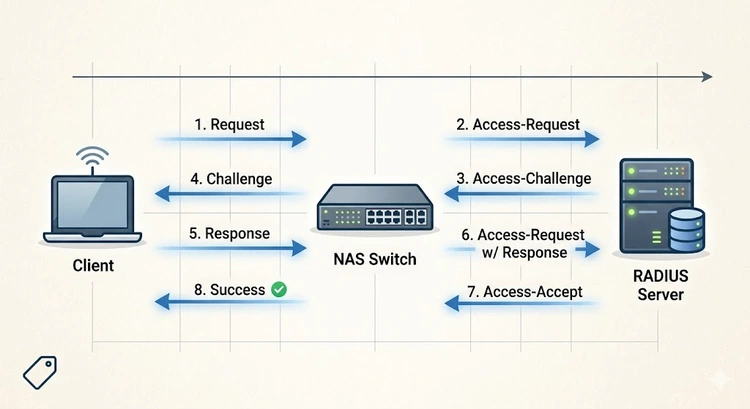
RADIUS (Remote Authentication Dial-In User Service) is the standard protocol for centralized network authentication, authorization, and accounting (AAA). It's used by enterprises, ISPs, and advanced home networks to control who can access the network and what they can do once connected.
When you connect to a corporate WiFi network using your employee credentials, or when your ISP validates your PPPoE login, RADIUS is handling the authentication behind the scenes. It works with 802.1X (WPA-Enterprise) to provide per-user WiFi authentication — far more secure than shared WPA2 passwords.
| Feature | RADIUS | TACACS+ |
|---|---|---|
| Protocol | UDP (1812/1813) | TCP (49) |
| Encryption | Password only | Full packet |
| AAA Separation | Combined auth + authz | Separate auth, authz, acct |
| Primary Use | Network access (WiFi, VPN) | Device admin (router/switch login) |
| Vendor Support | Universal | Primarily Cisco |
| Accounting | Built-in | Built-in |
| 802.1X Support | Yes (primary protocol) | No |
| Server | Platform | License | Best For |
|---|---|---|---|
| FreeRADIUS | Linux | Open Source (GPL) | Most deployments, ISPs, enterprises |
| Microsoft NPS | Windows Server | Included with Windows | Active Directory environments |
| Cisco ISE | Appliance/VM | Commercial | Large enterprise, advanced policy |
| Aruba ClearPass | Appliance/VM | Commercial | BYOD, guest access management |
| PacketFence | Linux | Open Source | NAC with captive portal |
Pro Tip: For home and small office deployments, FreeRADIUS with WPA2/WPA3 Enterprise provides per-user WiFi authentication. Each family member or employee gets unique credentials, and you can assign different VLANs per user — sending IoT devices to a restricted network automatically. Configure your AP at 192.168.1.1 to use 802.1X with your RADIUS server.
One of the most powerful RADIUS features is dynamic VLAN assignment. When a user authenticates, the RADIUS server returns VLAN attributes that tell the switch or AP which VLAN to place the user in:
# FreeRADIUS user entry for VLAN assignment
# /etc/freeradius/users

# Employee - gets VLAN 10 (main network)
john    Cleartext-Password := "secretpass"
        Tunnel-Type = VLAN,
        Tunnel-Medium-Type = IEEE-802,
        Tunnel-Private-Group-Id = "10"

# IoT device - gets VLAN 30 (restricted)
smart-thermostat    Cleartext-Password := "iotpass"
        Tunnel-Type = VLAN,
        Tunnel-Medium-Type = IEEE-802,
        Tunnel-Private-Group-Id = "30"
Plan your VLANs with our Smart Home Subnet Planner and set up isolation with the VLAN Segmentation Guide.
802.1X uses the Extensible Authentication Protocol (EAP) within RADIUS for WiFi authentication. The EAP method determines how credentials are verified:
| EAP Method | Security | Requires Certificate | Best For |
|---|---|---|---|
| EAP-TLS | Highest | Server + Client certs | Enterprise with PKI |
| EAP-PEAP (MSCHAPv2) | High | Server cert only | Most common for WiFi |
| EAP-TTLS | High | Server cert only | Linux/Android environments |
| EAP-FAST | High | Optional (PAC) | Cisco environments |
| EAP-SIM/AKA | High | SIM card | Mobile carrier offload |
RADIUS provides centralized authentication, authorization, and accounting for network access. It's used for WiFi authentication (802.1X/WPA-Enterprise), VPN access, wired network access control, and ISP subscriber management.
While primarily used in enterprise environments, RADIUS can benefit home labs and small offices. FreeRADIUS running on a Raspberry Pi can provide WPA-Enterprise WiFi authentication and dynamic VLAN assignment for your home network.
RADIUS uses UDP port 1812 for authentication and UDP port 1813 for accounting. Legacy implementations may use ports 1645 and 1646. Ensure these are open with our Port Checker.
802.1X is the IEEE standard for port-based network access control — it defines how devices authenticate at the network edge. RADIUS is the backend protocol that 802.1X uses to validate credentials. They work together: 802.1X is the framework, RADIUS is the authentication server.
Yes, RADIUS can return VLAN assignment attributes (Tunnel-Type, Tunnel-Medium-Type, Tunnel-Private-Group-Id) that tell the switch or AP which VLAN to place the authenticated user in. This enables per-user network segmentation.
RADIUS encrypts only the password field in Access-Request packets. For better security, use EAP methods (which provide their own encryption layer) and consider RadSec (RADIUS over TLS) for the server-to-server communication. Always use strong shared secrets between NAS and server.

About Tommy N.
Tommy is the founder of RouterHax and a network engineer with 10+ years of experience in home and enterprise networking. He specializes in router configuration, WiFi optimization, and network security. When not writing guides, he's testing the latest mesh WiFi systems and helping readers troubleshoot their home networks.
 |
 |
 |
 |
Search
Popular Tools
Browse Guides
Promotion for FREE Gifts. Moreover, Free Items here. Disable Ad Blocker to get them all.
Once done, hit any button as below
|
|
|
|