
Calculate allowed downtime based on your Service Level Agreement uptime percentage. See how "five nines" translates to seconds of downtime and estimate service credit penalties for SLA breaches.
A Service Level Agreement (SLA) is a contract between a service provider and customer that defines the expected level of service, including uptime guarantees, performance metrics, and penalties for breaches. For network services, the most critical SLA metric is uptime percentage.
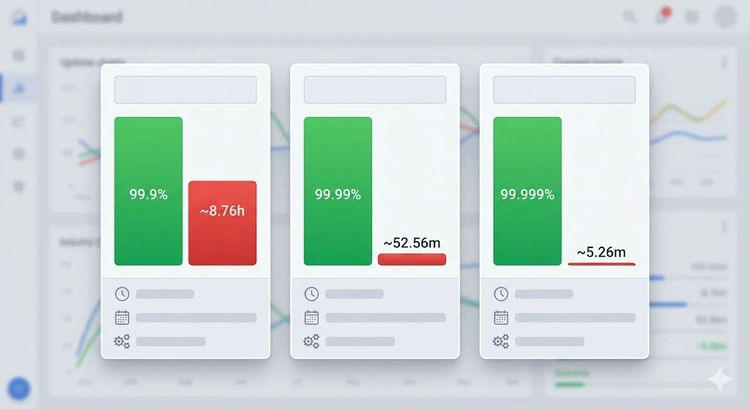
Understanding SLA math is essential for network administrators managing business-critical services. The difference between 99.9% and 99.99% may seem trivial, but it represents the difference between 8.7 hours and 52.5 minutes of allowed annual downtime — a significant gap for production systems.
| Nines | Uptime % | Downtime/Year | Downtime/Month | Typical Use Case |
|---|---|---|---|---|
| One Nine | 90% | 36.5 days | 3 days | Personal projects |
| Two Nines | 99% | 3.65 days | 7.3 hours | Internal tools |
| Three Nines | 99.9% | 8.76 hours | 43.8 minutes | Business applications |
| Four Nines | 99.99% | 52.6 minutes | 4.4 minutes | E-commerce, SaaS |
| Five Nines | 99.999% | 5.26 minutes | 26.3 seconds | Telecom, financial |
| Six Nines | 99.9999% | 31.5 seconds | 2.6 seconds | Emergency services |
A comprehensive network SLA covers more than just uptime. When reviewing ISP or cloud provider SLAs, look for these metrics:
| Metric | Description | Typical SLA | How to Measure |
|---|---|---|---|
| Uptime | Percentage of time service is available | 99.9% - 99.99% | Monitoring tools |
| Latency | Round-trip time for packets | < 50 ms regional | Ping Test |
| Packet Loss | Percentage of packets dropped | < 0.1% | Continuous monitoring |
| Jitter | Variation in latency | < 5 ms | Network monitoring |
| MTTR | Mean Time to Repair/Resolve | 1-4 hours | Incident tracking |
| Throughput | Guaranteed minimum bandwidth | 95% of committed rate | Speed Test |
Pro Tip: SLA uptime calculations typically exclude scheduled maintenance windows — meaning your provider can have planned downtime without breaching the SLA. Always check the fine print for maintenance exclusions, force majeure clauses, and how "downtime" is defined. Some providers only count downtime if it lasts more than 5 consecutive minutes, which can hide brief but frequent outages.
Moving from three nines (99.9%) to four nines (99.99%) requires significant infrastructure investment. Here are common strategies:
To calculate your actual uptime over a given period, use this formula:
Uptime % = ((Total Minutes - Downtime Minutes) / Total Minutes) × 100

# Example: 1 month with 45 minutes downtime
# Total minutes in a month: 43,830
# Uptime = ((43,830 - 45) / 43,830) × 100 = 99.897%

# This falls below a 99.9% SLA target!Five nines means 99.999% uptime, allowing only 5.26 minutes of downtime per year. This is carrier-grade availability required for telecommunications and financial systems. It demands fully redundant infrastructure with automatic failover.
Most SLAs measure downtime as consecutive minutes where the service is unavailable. Some providers require you to report downtime via a support ticket within a specific timeframe to qualify for credits. Always check how your provider defines and measures downtime.
Typically, the provider issues service credits — a percentage reduction on your next bill. Credits usually range from 10-30% of the monthly fee depending on the severity of the breach. You usually need to file a claim to receive credits.
Usually not. Most SLAs exclude pre-announced maintenance windows from downtime calculations. This is why providers schedule maintenance during off-peak hours and notify customers in advance.
Use monitoring tools that send regular pings or HTTP checks to your services. Options include Uptime Robot, Pingdom, Nagios, or Zabbix. Combine with SNMP monitoring for device-level health tracking.
Residential ISPs typically offer 99% to 99.5% uptime (if any SLA at all). Business-grade connections usually guarantee 99.9% or better. Enterprise dedicated circuits may offer 99.99%. Check your specific contract terms and verify with regular speed tests.

About Tommy N.
Tommy is the founder of RouterHax and a network engineer with 10+ years of experience in home and enterprise networking. He specializes in router configuration, WiFi optimization, and network security. When not writing guides, he's testing the latest mesh WiFi systems and helping readers troubleshoot their home networks.
 |
 |
 |
 |
Search
Popular Tools
Browse Guides
Promotion for FREE Gifts. Moreover, Free Items here. Disable Ad Blocker to get them all.
Once done, hit any button as below
|
|
|
|