
Calculate the number of mesh WiFi nodes you need for complete coverage. Enter your home's details below and get a personalized recommendation based on your square footage, floor count, and wall construction.
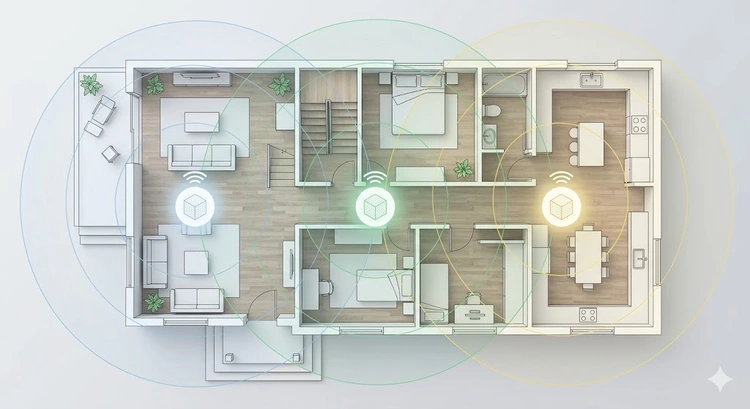
A mesh WiFi system uses multiple interconnected nodes (or satellites) to create a single, seamless wireless network throughout your home. Unlike a traditional router with a WiFi extender, mesh systems use intelligent routing to hand off your device connection as you move between rooms, eliminating dead zones without separate network names.
Mesh systems are ideal for larger homes, multi-floor buildings, and homes with challenging construction materials like brick or concrete that block WiFi signals. For smaller spaces, a single high-quality router may be sufficient — see our mesh WiFi vs extender comparison to decide.
The number of nodes depends on four primary factors. Use the calculator above for a personalized recommendation, or refer to this general guide:
| Home Size (sq ft) | Floors | Standard Walls | Thick Walls (Brick/Concrete) |
|---|---|---|---|
| Under 1,000 | 1 | 1-2 nodes | 2 nodes |
| 1,000 - 1,500 | 1-2 | 2 nodes | 2-3 nodes |
| 1,500 - 2,500 | 1-2 | 2-3 nodes | 3-4 nodes |
| 2,500 - 3,500 | 2-3 | 3-4 nodes | 4-5 nodes |
| 3,500 - 5,000 | 2-3 | 4-5 nodes | 5-6 nodes |
| 5,000+ | 3+ | 5+ nodes | 6+ nodes |
Pro Tip: Manufacturers' coverage claims are based on ideal, open-space conditions. Real-world coverage is typically 30-50% less due to walls, furniture, and interference from neighboring WiFi networks. The calculator above already accounts for wall materials and room layouts. If you have an IoT-heavy smart home, you may need extra nodes to handle the device density in certain rooms.
Here's how the leading mesh systems compare in terms of coverage, features, and price:
| System | WiFi Standard | Coverage per Node | Max Nodes | Wired Backhaul | Price (2-pack) |
|---|---|---|---|---|---|
| Eero Pro 6E | WiFi 6E (AXE5400) | ~2,000 sq ft | 10+ | Yes (2x Gigabit) | $350-400 |
| Netgear Orbi RBK863S | WiFi 6E (AXE11000) | ~2,500 sq ft | 6 | Yes (10 Gig) | $700-900 |
| TP-Link Deco XE75 | WiFi 6E (AXE5400) | ~2,500 sq ft | 10 | Yes (Gigabit) | $250-300 |
| Google Nest WiFi Pro | WiFi 6E (AXE5400) | ~2,200 sq ft | 6 | No | $250-300 |
| Asus ZenWiFi XT9 | WiFi 6 (AX7800) | ~2,750 sq ft | 5 | Yes (2.5 Gig) | $350-450 |
| Linksys Velop MX5300 | WiFi 6 (AX5300) | ~3,000 sq ft | 5 | Yes (Gigabit) | $300-400 |
Understanding the differences helps you choose the right solution for your needs:
| Feature | Mesh WiFi | WiFi Extender | Access Point |
|---|---|---|---|
| Seamless roaming | Yes | No (separate SSID often) | Yes (with controller) |
| Speed loss | Minimal (dedicated backhaul) | 50% per hop | None (wired) |
| Setup difficulty | Easy (app-guided) | Easy | Moderate-Hard |
| Wiring needed | Optional | No | Yes (Ethernet to each AP) |
| Best for | Most homes | Budget single dead zone | New construction, businesses |
| Cost | $200-$600 | $20-$80 | $80-$200 per AP + switch |
For more detail, read our comparisons: mesh WiFi vs extender and mesh WiFi vs access point.
Where you place your nodes matters as much as how many you have. Follow these guidelines for optimal coverage:
If you're considering Ethernet backhaul between nodes (highly recommended for best performance), you'll need to run Ethernet cables between node locations. This eliminates the wireless backhaul bottleneck. Check our Bandwidth Calculator to see if your internet plan can fully utilize a mesh system. If you're also connecting dedicated access points, our Subnet Calculator can help plan your IP scheme.
Understanding what kills your WiFi signal helps explain why the calculator adjusts coverage estimates:
Use our Speed Test at various locations in your home to identify dead zones before choosing mesh node placement. For gaming or streaming in specific rooms, use QoS settings to prioritize traffic from those nodes. If you're managing many smart home devices, a dedicated IoT network keeps your main network fast.
For a typical 2,000 sq ft home with 2 floors and standard drywall construction, you'll need 2-3 mesh nodes. With brick or concrete walls, plan for 3-4 nodes. Use the calculator above for a personalized recommendation based on your specific layout.
Yes, for most users. Mesh systems provide seamless roaming, consistent speeds, and a single network name. Range extenders are cheaper but create separate networks and cut bandwidth in half per hop.
Yes, all major mesh systems support adding nodes after initial setup. Most systems support 5-10 nodes total. Simply purchase an additional node and add it through the manufacturer's app.
No. Mesh nodes communicate wirelessly by default. However, connecting nodes via Ethernet cable (wired backhaul) significantly improves performance by eliminating the wireless backhaul bottleneck.
Place the primary node centrally on the main floor. Satellite nodes should be 20-40 feet apart, elevated 3-5 feet, and positioned with as few walls between them as possible. Avoid closets, behind TVs, or near metal appliances.
Yes. Modern mesh systems with WiFi 6 or 6E can handle 100+ simultaneous devices. For smart home setups, consider creating a dedicated IoT VLAN to separate smart devices from your main network.
Mesh WiFi provides good gaming performance, especially with wired backhaul and QoS enabled. For the lowest possible latency, connect your gaming device directly to the nearest mesh node via Ethernet.

About Tommy N.
Tommy is the founder of RouterHax and a network engineer with 10+ years of experience in home and enterprise networking. He specializes in router configuration, WiFi optimization, and network security. When not writing guides, he's testing the latest mesh WiFi systems and helping readers troubleshoot their home networks.
 |
 |
 |
 |
Search
Popular Tools
Browse Guides
Promotion for FREE Gifts. Moreover, Free Items here. Disable Ad Blocker to get them all.
Once done, hit any button as below
|
|
|
|